Consistent characters in AI video: lock the look before you animate
Lesson 2 of the free course. Why AI characters change from shot to shot, and the workflow that stops it: a style bible, a character sheet, reference images, and animating only frames you have already approved.
Updated · 10 min read · By the PromptLab team
The short version
- Text alone cannot hold a character: every generation invents a new face from the same words.
- Lock the style first with a style bible and a fixed prompt suffix, then lock the character with a sheet and reference images.
- Seeds help you compare variations of one shot, but they do not carry identity across different shots.
- The most reliable workflow is reference images to approved stills, then image-to-video from those stills. In our test the jacket, collar and goggles held across shots; a pose instruction and the coastline did not, so check every frame.
- Some video models restrict reference photos of real people. Use original characters, and get consent for any real likeness.
In this guide
Why AI characters change from shot to shot
This is lesson 2 of Make a short film with AI. In lesson 1 you planned a twelve-shot film. Before animating any of it, you need the character in shot 1 to be recognizably the character in shot 12.
By default, it will not be. A prompt like "a grizzly bear in a leather jacket" describes thousands of possible bears. Each generation starts from fresh random noise and resolves it into one of them, so two renders of the same words give you two different individuals. Change the model and the gap grows, because each model learned its own idea of what those words look like.
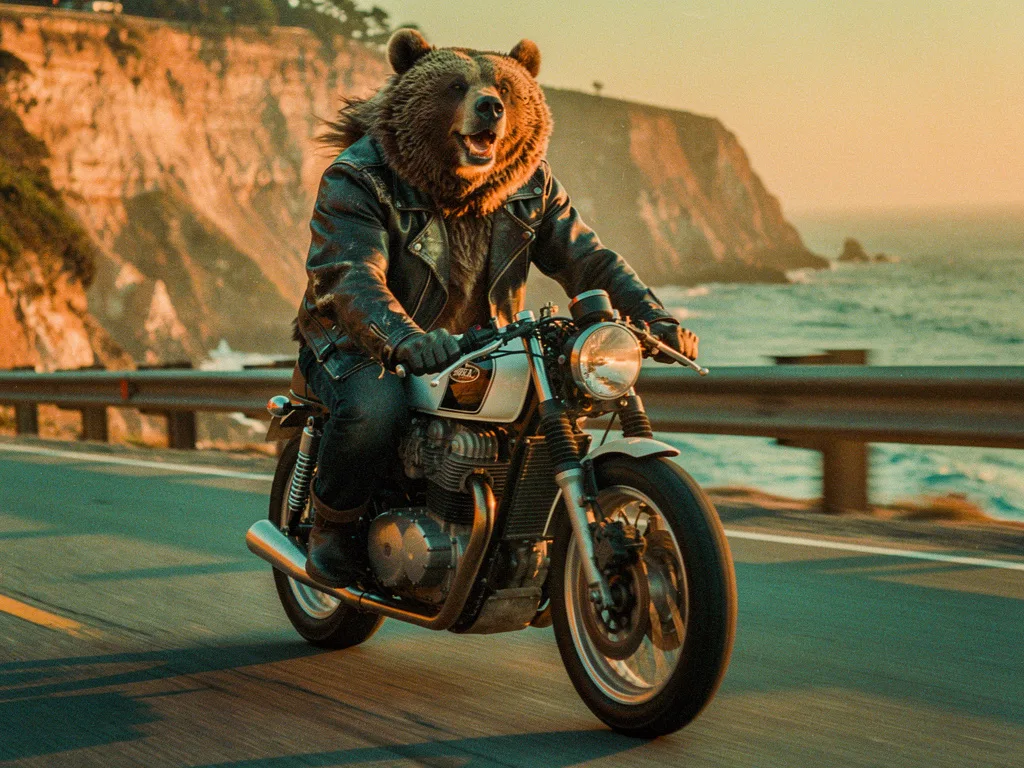
A grizzly bear in a leather jacket riding a vintage café racer motorcycle through the Pacific Coast Highway, cinematic golden hour, 35mm film photograph, slight motion blur, joyful
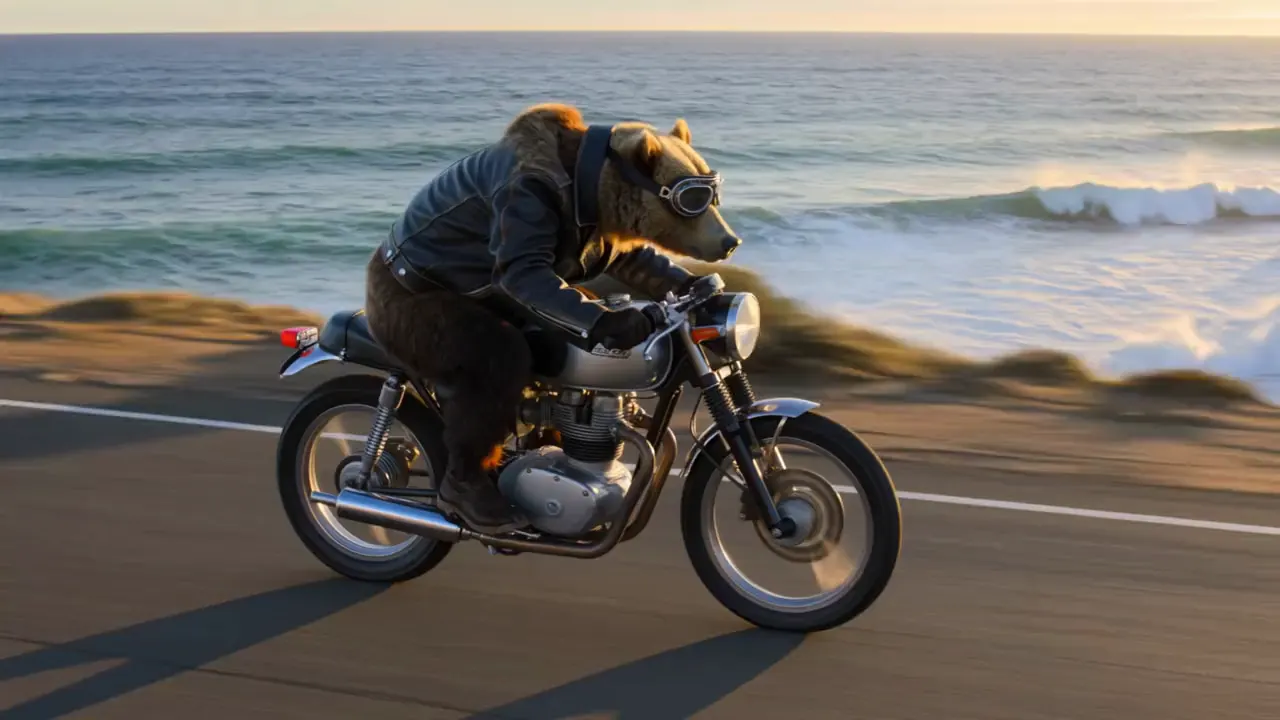
A grizzly bear in a worn leather jacket and aviator goggles rides a vintage café racer motorcycle along a coastal highway at golden hour, camera tracking alongside, fur rippling in the wind, waves crashing below, cinematic
These two renders share a concept and most of their wording. They do not share a character. The clip's prompt also asked for aviator goggles, but set those aside and the bears still differ: the still has a lighter, shaggier coat and an open-mouthed grin, the clip a darker coat and a different face. Neither model did anything wrong. Nothing told them which bear you meant.
Fixing that takes three layers, in this order:
- Style: the film looks like one film (palette, lens, light, texture).
- Character: the same face, build, wardrobe and props in every shot.
- Motion: identity survives animation because you animate approved frames.
Start with a style bible
A style bible is a one-page description of how every frame of your film looks. On a live-action production it would be the cinematographer's look book. For AI, it becomes a fixed block of words you paste, unchanged, at the end of every image prompt. Models weigh repeated wording consistently, so a stable suffix gives you a stable look even when the subject changes completely.
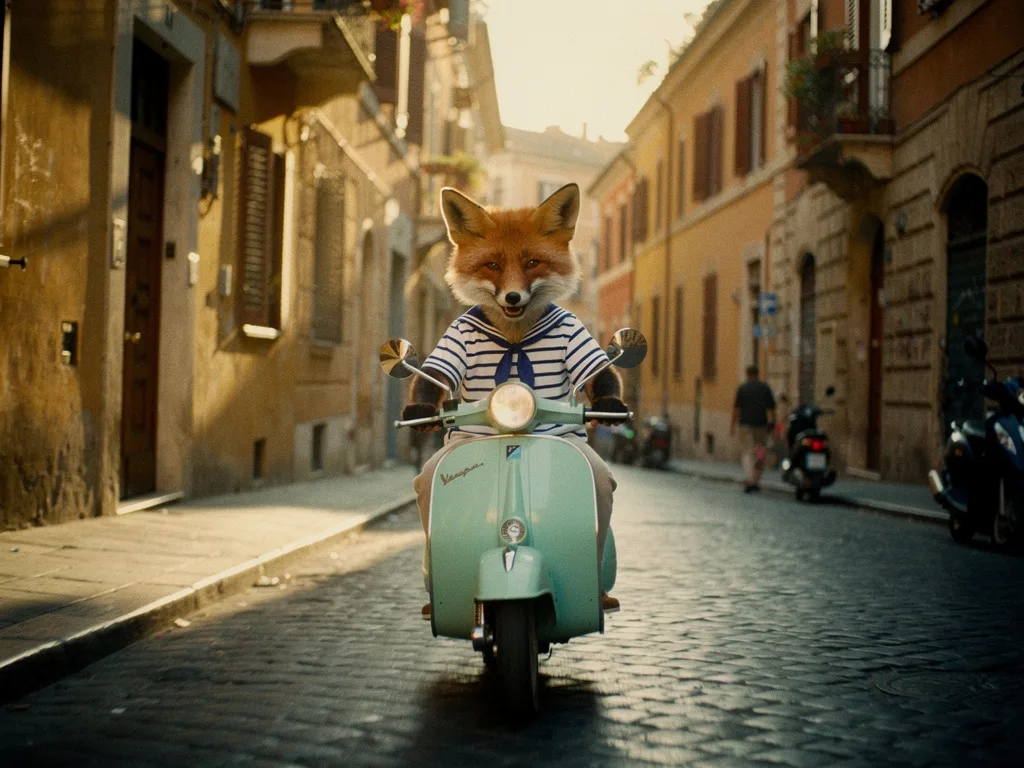
A red fox in a striped sailor shirt riding a mint-green Vespa through a cobbled street in Rome, cinematic golden hour, 35mm film photograph, slight motion blur, joyful
The fox above comes from a six-image test we ran with one template. Its last clause, "cinematic golden hour, 35mm film photograph, slight motion blur, joyful", is the entire style bible in compressed form. Write yours out in full first, then compress it:
| Field | What to decide | Our matrix test |
|---|---|---|
| Medium and format | Photograph, film still, animation, illustration | 35mm film photograph |
| Light | Time of day, direction, quality | Golden hour, low warm sun |
| Palette and grade | Three to five colors, warm or cool, contrast | Not specified (the model chose warm amber and teal) |
| Lens and camera | Focal length, depth of field, height | Not specified beyond "cinematic" |
| Texture | Grain, motion blur, halation, sharpness | Slight motion blur, film grain from "35mm" |
| Mood | One word | Joyful |
The empty rows matter. Where we did not specify a palette or lens, the model made its own choice each time, and those choices are where the set varies most. A production style bible should fill every row, for example: "warm amber and teal palette, 35mm lens at eye level, shallow depth of field, fine film grain".
Test the style with a template and variables
The quickest way to find out whether a style bible holds is to keep it fixed and change everything else. That is what our matrix test does. One template, three variables, six rows:
A [animal] riding a [vehicle] through [place], cinematic golden hour, 35mm film photograph, slight motion blur, joyful
| [animal] | [vehicle] | [place] |
|---|---|---|
| grizzly bear in a leather jacket | vintage café racer motorcycle | the Pacific Coast Highway |
| red fox in a striped sailor shirt | mint-green Vespa | a cobbled street in Rome |
| penguin in a puffer vest | snowmobile | an Antarctic ice field |
| giraffe in a Hawaiian shirt | longboard skateboard | Venice Beach boardwalk |
| sloth in a knitted beanie | Dutch bicycle | an Amsterdam canal street |
| pug in a life vest | jet ski | Miami's turquoise water |
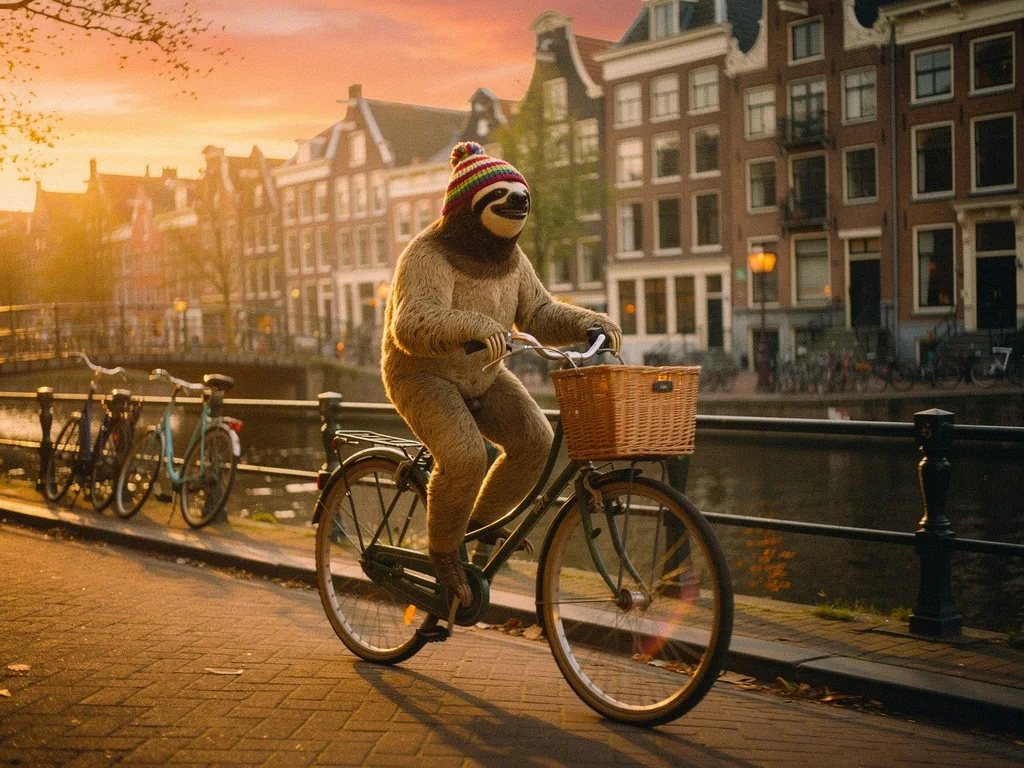
A sloth in a knitted beanie riding a Dutch bicycle through an Amsterdam canal street, cinematic golden hour, 35mm film photograph, slight motion blur, joyful
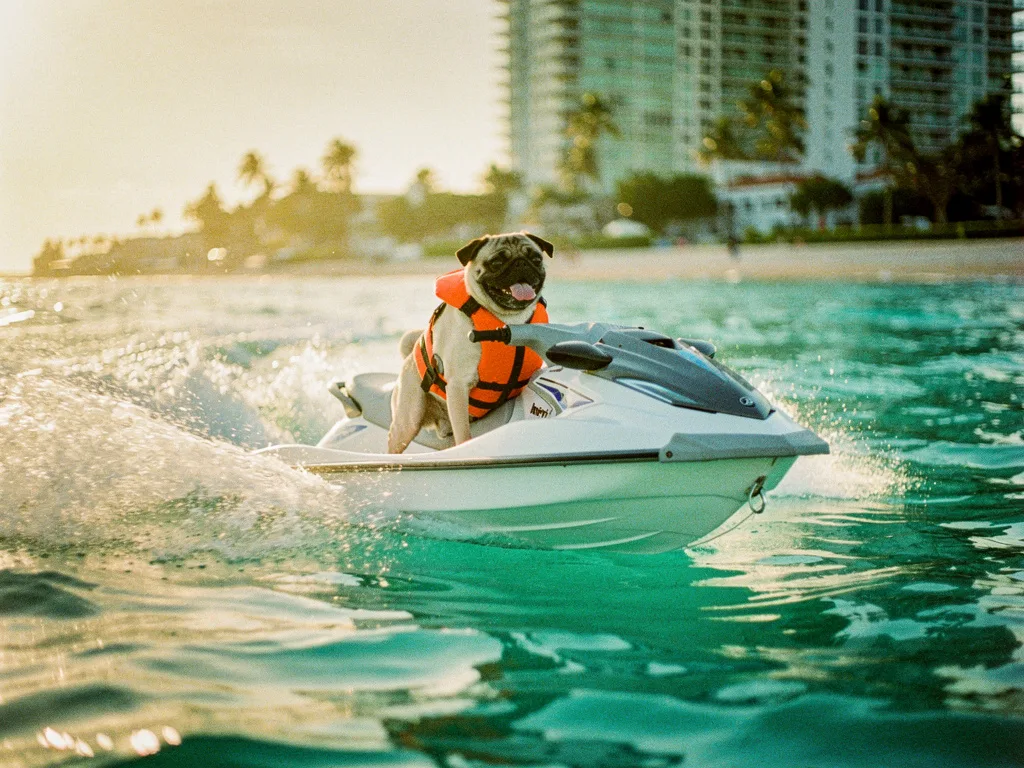
A pug in a life vest riding a jet ski through Miami's turquoise water, cinematic golden hour, 35mm film photograph, slight motion blur, joyful
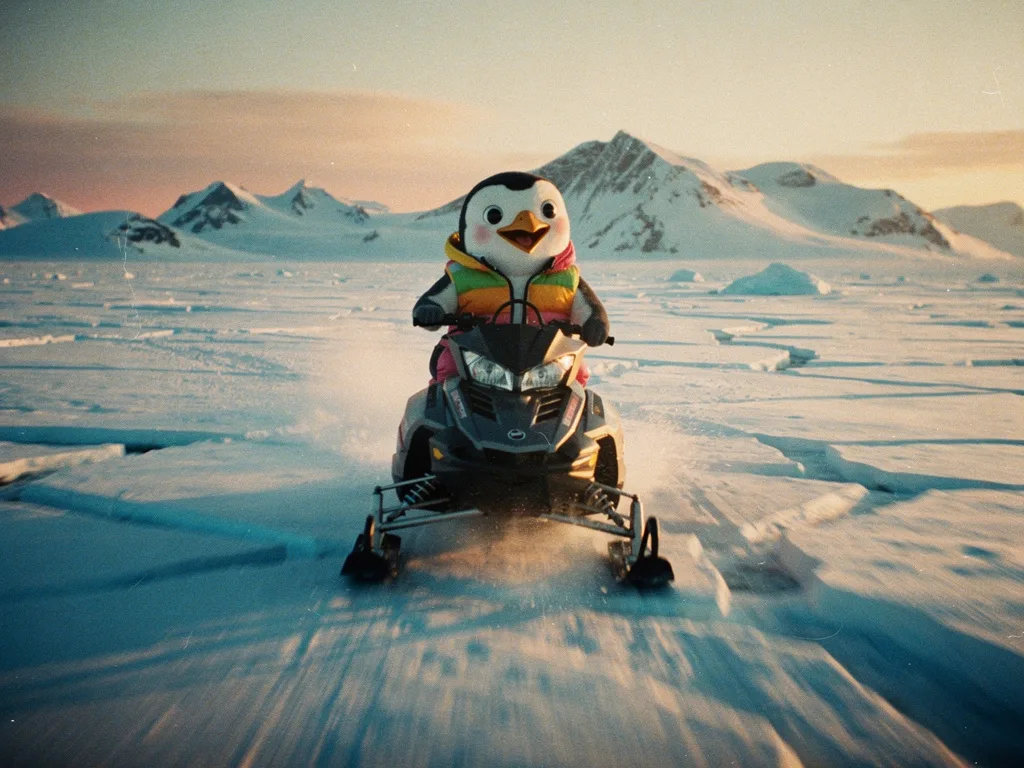
A penguin in a puffer vest riding a snowmobile through an Antarctic ice field, cinematic golden hour, 35mm film photograph, slight motion blur, joyful
To be clear about what this shows: these are six different characters, not one character six times. What the test demonstrates is style consistency (one character across several shots comes later in this lesson, with the bear). Five of the six read as frames from the same film: warm low sun, film grain, a camera at roughly eye level, a happy animal on its vehicle. The penguin is the useful failure. Its grain and light still match, but the animal came back as a cartoon mascot with rosy cheeks instead of a photographed bird. If this were a real film, that frame would be rejected and re-rolled, or the template would gain a word like "real" or "wildlife photograph" for that row.
In PromptLab this is what a Consistency run does: a prompt template with variables, a drafter that proposes values, the whole matrix (up to 10 variants) rendered in one run, and a pass/fail score for each row so outliers like the penguin are flagged rather than discovered in the edit.
Build a character sheet with fixed wording
Once the style holds, lock the character. A character sheet has two parts: a written description you never paraphrase, and a set of reference images.
The written part is a "character lock": one sentence that names the features a viewer uses to recognize someone, in the same words and the same order every time. Synonyms are the enemy. If shot 3 says "leather jacket" and shot 7 says "biker jacket", you have asked for two different jackets.
[name], a [age and build] [species or person] with [two or three facial features], wearing [one garment with color and material], [one signature prop or accessory]
The visual part is a reference set. Generate it once, early, and reuse it everywhere:
- Turnaround
- The character in a neutral pose from the front, three-quarter, profile and back, on a plain background. Gives reference models every angle.
- Expression sheet
- Four to six close-ups: neutral, happy, surprised, determined. Faces are where drift shows first.
- Wardrobe and props
- Close-ups of anything that must not change: the jacket, the goggles, the motorbike.
- Style frames
- Two or three finished-looking frames of the character in the film's light and grade. These become the look your other shots are judged against.
Here is the turnaround we generated for our bear, using the same character description as the example above:
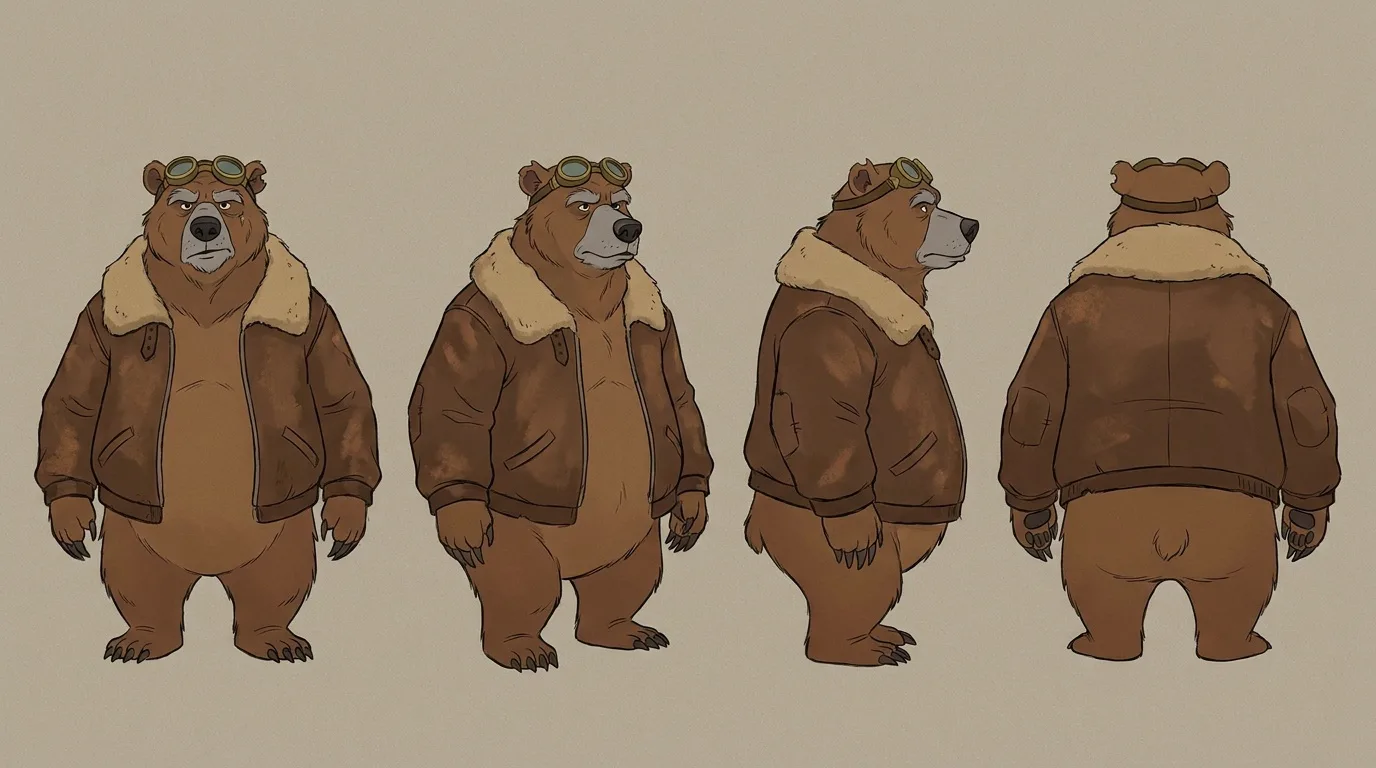
Character turnaround sheet of an old heavyset grizzly bear with a grey muzzle and a torn left ear, wearing a worn brown leather jacket with a sheepskin collar and round brass aviator goggles pushed up on his head: front view, three-quarter view, profile and back view side by side, full body, plain warm-grey background, 35mm film look
It is a usable sheet: four views, consistent proportions, the grey muzzle, the sheepskin collar and the goggles in every view. But it is not what we asked for in one important way. The prompt ends with "35mm film look", and the result is a flat, hand-drawn cartoon on a plain background. Our best explanation: "character turnaround sheet" is strongly tied to illustrated model sheets, and here it outweighed the style words. The torn left ear is also hard to make out at this size.
That matters more than it looks, because a reference carries its style along with its identity. Every shot built from this sheet below keeps a drawn bear. Check the sheet's style before you build anything on it. If you need a photographic character, one approach to try is generating a single photographic portrait first and building the other views from it as a reference, rather than asking for a sheet straight away.
Why a fixed seed isn't enough
A seed sets the random noise a generation starts from. With the same model, the same prompt, the same size and the same seed, you will usually get the same image. That makes seeds useful for one thing: changing a single word and seeing what that word did.
It does not make them a consistency tool. A new shot needs a new prompt (different pose, framing, setting), and a different prompt sends the same noise somewhere different. Change the aspect ratio or the model and the seed means nothing at all. Use seeds to compare variations of one shot; use references to carry a character between shots.
Reference-image workflows that hold identity
Reference images are what actually carry identity. Instead of hoping the words land on the same face, you show the model the face. The current generation of image models is built for this. Google says Nano Banana Pro can blend up to 14 input images and keep the resemblance of up to 5 people, which covers a character sheet plus a location and a prop or two. Other multi-reference models work similarly with fewer inputs.
Generate the character sheet
Text-to-image with your character lock and style suffix. Generate many, pick one, then build the turnaround and expressions from that one by passing it back in as a reference.
Make each shot's start frame from references
For every row of the shot list, attach the turnaround (and a location frame if you have one) and prompt only the shot: framing, pose, setting, light. Refer to the character by the lock sentence and say to keep the face, outfit and props identical to the reference.
Approve stills side by side
Put every start frame next to the style frames before you animate anything. In the example below, the garage still cost 38 credits; the clips we later animated from it cost 57 to 305 credits each, depending on the video model.
Animate the approved frames
Use image-to-video on each still. The video model starts from your exact frame, so the identity you approved is already in the first frame of motion.
Re-anchor long sequences
If you extend clips from their last frames, compare the end of each extension with the character sheet, and start the next shot from a fresh reference-built still when it drifts.
The bear, shot by shot
We ran this workflow on the bear for three frames of the lesson 1 film. Each start frame was made with Nano Banana Pro Edit, with the sheet attached and a prompt that points back to the reference. First, the garage at dawn:
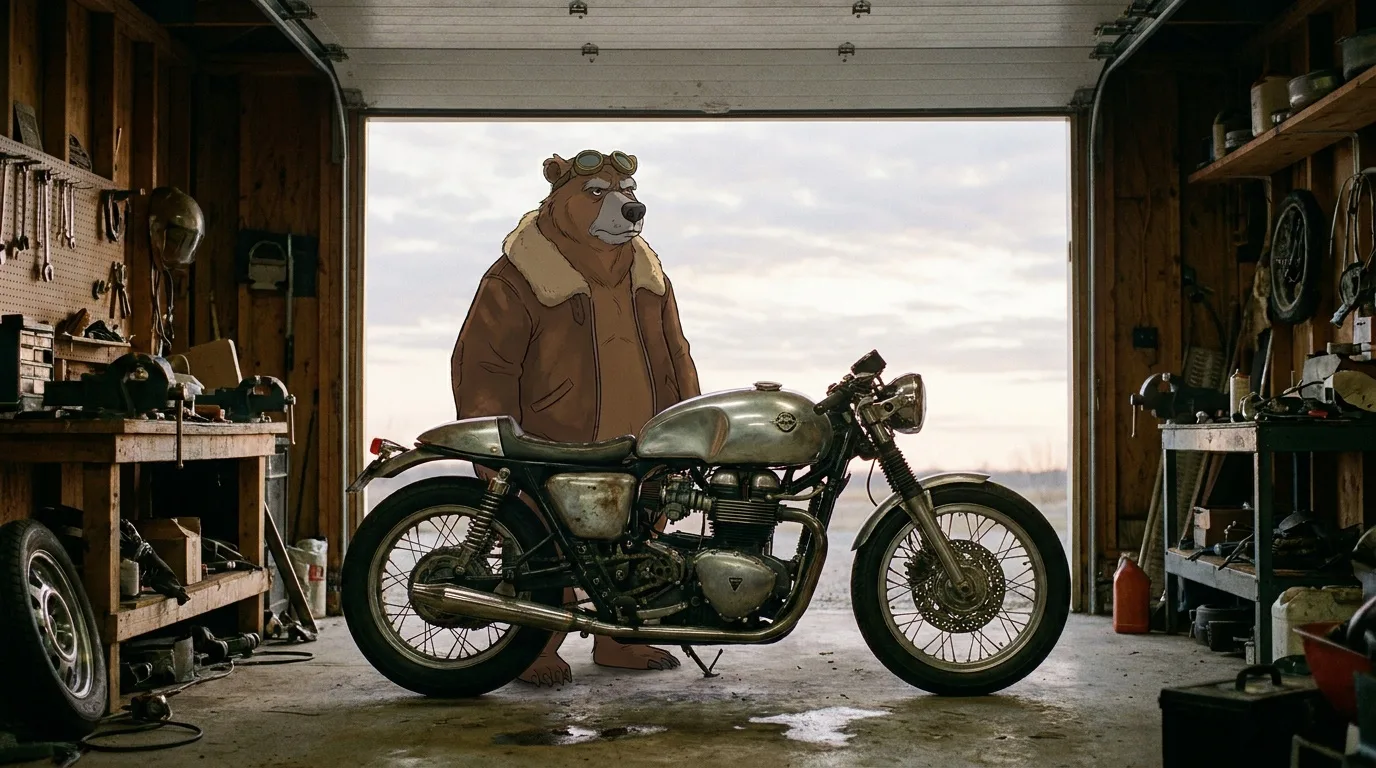
The bear from the character sheet, same grey muzzle, torn left ear, leather jacket and brass goggles, standing beside a vintage café racer motorcycle in a cluttered wooden garage at dawn, garage door open to a pale sky, cinematic wide shot, 35mm film look
The identity carried. The grey muzzle, the heavy brow, the brown jacket with its sheepskin collar and the brass goggles on his head all match the sheet. So did the style: the bear is still a drawn character, now standing in a photographic garage. Whether that mixed look works is a creative call, but it is a direct result of the sheet, not something the edit invented. Next, the ride toward the lighthouse:
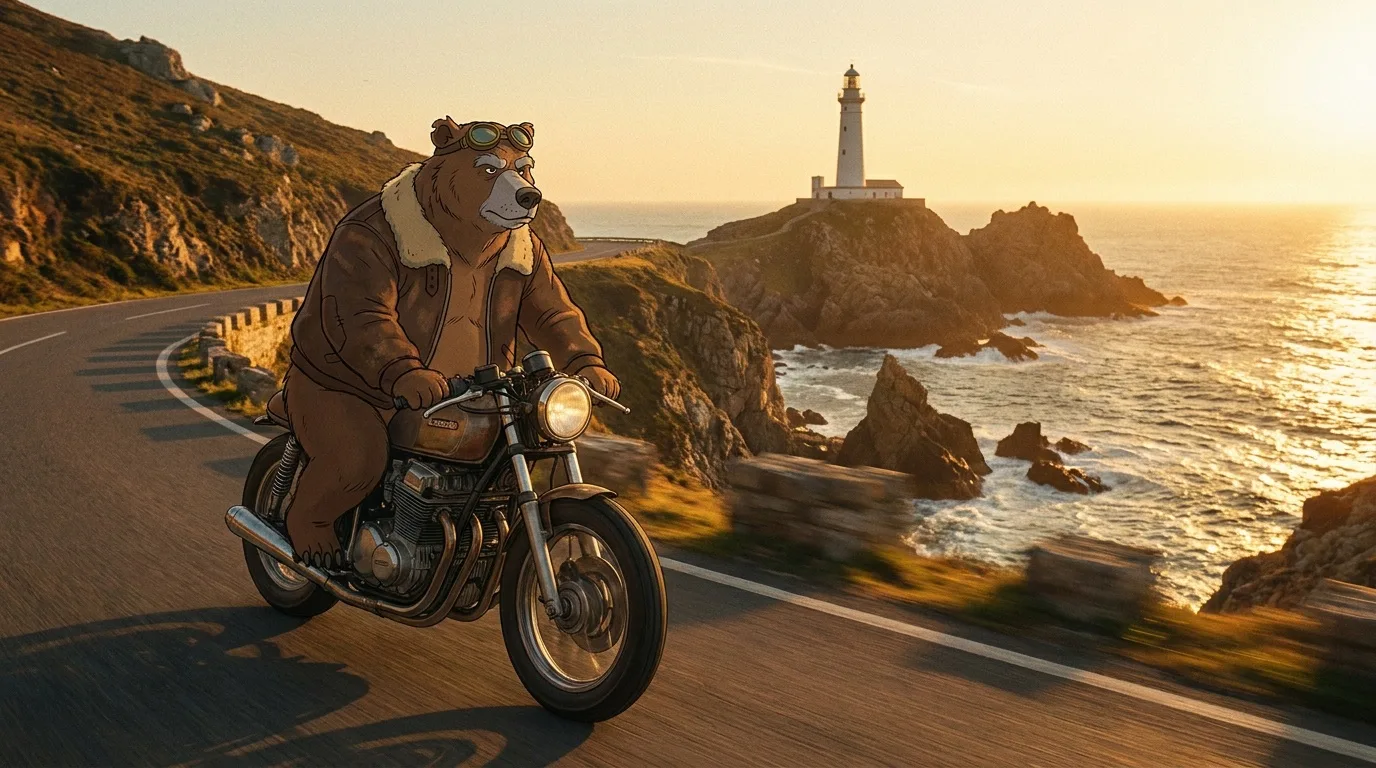
The bear from the character sheet, same grey muzzle, torn left ear, leather jacket and brass goggles, riding a vintage café racer motorcycle along a cliff road towards a white lighthouse at golden hour, sea on the right, cinematic wide shot, 35mm film look
Same bear, same jacket and goggles, a completely different setting and pose. Now look at the motorcycle. In the garage it has a silver tank; on the cliff road it is a different bike with a bronze tank. The sheet shows only the bear, so nothing anchored the bike, and the model designed a new one for each shot. This is why the wardrobe-and-props part of the reference set includes the vehicle.
For the third frame we attached two references, the sheet and the ride, and asked for the moment the bear arrives:
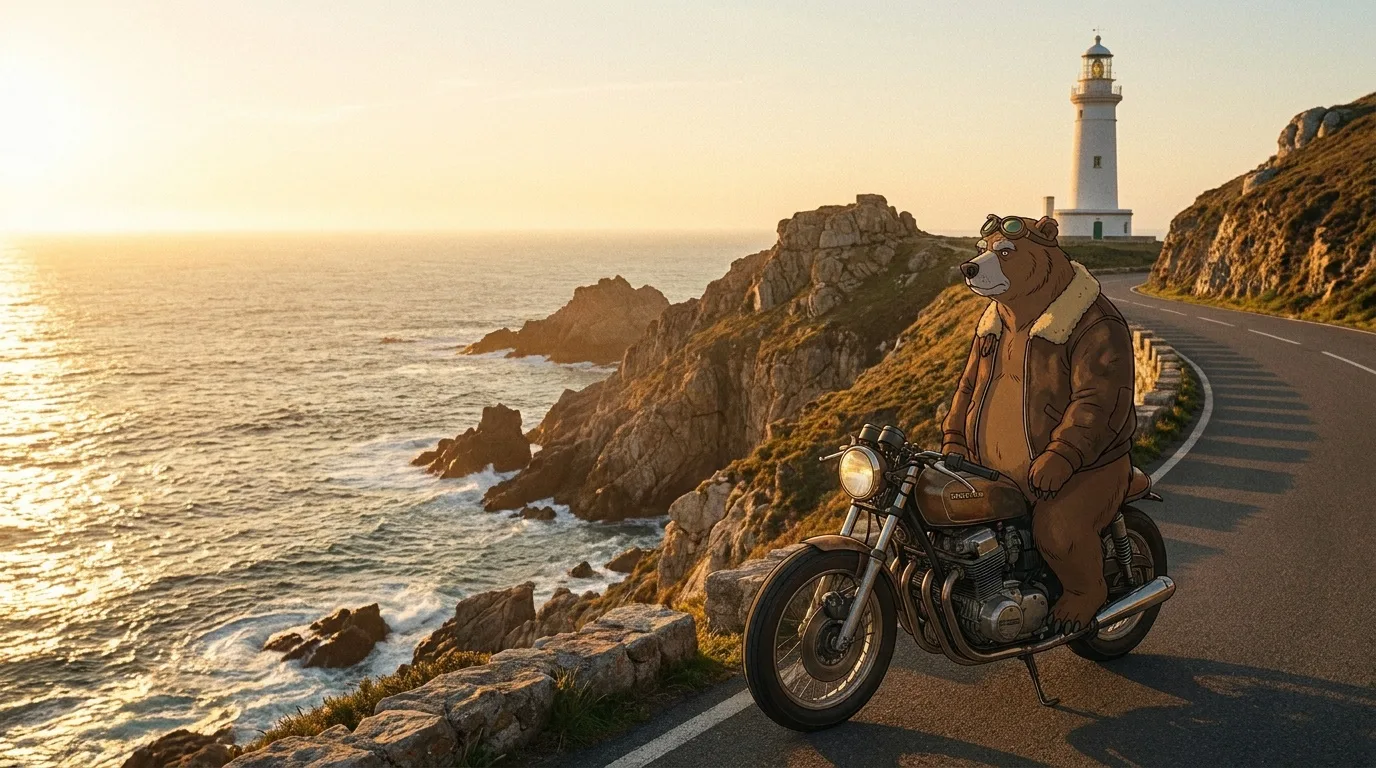
The same bear and the same motorcycle from the reference images, now stopped at the foot of the white lighthouse, the bear standing beside the bike and looking out to sea, golden hour, same cliff road and coastline, cinematic wide shot, 35mm film look
This is the honest result of a reference workflow on a first try. What held: the bear, and the bike, which now matches the ride because the ride frame was a reference. What did not: the prompt says "the bear standing beside the bike and looking out to sea", and the bear is still sitting on it. And although the prompt asks for the "same cliff road and coastline", the geography has flipped: in the ride the sea is on the right and the lighthouse sits on a headland ahead; here the sea fills the left of the frame and the lighthouse stands on the right, above the road.
Fixes, cheapest first:
- Edit the frame you have. The bear and bike are right, so a targeted edit ("the bear now stands beside the motorcycle, keep everything else unchanged") is cheaper than starting over.
- Watch what your references show. The ride reference shows a seated rider, which may be pulling the result toward sitting. Put the new pose first in the prompt, or give the bike its own reference instead of a frame that also shows the old pose.
- State the geography, or use it. If the layout matters, say where things are ("sea on the right, lighthouse ahead"). Or accept the flip as a reverse angle and cut it that way: it is still a plausible view of the same place.
Some video models also accept reference images directly, so you can skip the still for simpler shots. Veo 3.1, for example, takes up to three reference images of a character, object or scene, and Kling 3.0 can anchor characters and objects as reference "elements". Animating from an approved still is still the more controllable route, because you see and approve the frame before paying for motion. You can see identity carry through animation in the restaurant clip in lesson 3: the jacket, bow tie and face of the start frame hold for all five seconds. Lesson 3 also animates the ride and the stop frames above as the first and last frames of one clip.
In PromptLab the Playground has a character tool (Reference to Image) and a Reference to Video tool, and each only lists models that accept reference images, with settings normalized across them. To see which model keeps your character best, run the same references and prompt through the Benchmark on up to four models at once and rate them on resemblance.
Real faces, likeness and model restrictions
If your character is a real person, two extra constraints apply: what the models allow, and what is fair to the person.
Some video models refuse reference images that contain real human faces. Seedance 2.0 is the best-known example: platforms that offer it report that reference uploads with a detectable real face are rejected, although the model can still generate people from a text prompt. Rules differ between models and change often, so check the model page before you build a workflow around a real actor's face.
The same goes for style. Rather than naming a living artist or director in your style bible, describe the qualities you admire: the palette, the lens, the framing, the light. It produces a look you own, and it makes the style bible more precise.
How to fix a shot where the character drifted
Even with a full reference set, some shots will come back slightly wrong: the scarf changes color, the ear is torn on the wrong side, the face looks like a cousin. Work through the fixes from cheapest to most expensive:
- Fix the still, not the clip. If the drift is already in the start frame, repair it with a targeted edit ("make the scarf red, keep everything else unchanged") and animate the repaired frame. Never pay for motion on a frame you would not approve as a still.
- Strengthen the references. Add the close-up that shows the feature that drifted, or remove references that contradict each other (two jackets in two reference images will blend).
- Shorten the clip or calm the motion. Big head turns and long takes give identity the most room to wander. A 5-second clip with a slow push-in drifts less than a 10-second orbit.
- Cut around it. If one second of a clip is off, trim it. If the face is off in a wide shot, cover the moment with a cutaway. Editors have hidden continuity errors this way for a century.
Continuity checklist before you animate
Lock before motion
- Style suffix pasted unchanged into every prompt
- Character lock sentence identical in every shot, same word order
- Turnaround and expressions attached as references for every start frame
- All start frames approved side by side with the style frames
- One silhouette feature visible in every wide shot
Common continuity breaks
- Paraphrasing the outfit from shot to shot
- Switching models mid-scene without re-checking the face
- Relying on a seed to carry a character into a new pose
- Animating straight from text for shots that feature the main character
- Extending a clip many times without re-anchoring
With a locked look and a set of approved start frames, you are ready to animate. The next lesson covers image-to-video prompts and camera movement: how to describe only what moves, and how to keep your character intact while it does.
Questions people ask
How do I keep a character consistent in AI video?+
Generate approved still frames of the character from reference images, using the same written description in every prompt, then animate those stills with image-to-video. The video model starts from the exact face you approved instead of inventing a new one.
Does using the same seed keep a character consistent?+
Only for near-identical prompts on the same model and size. A new shot needs a different prompt, which changes the result even with the same seed, so use reference images to carry a character between shots.
How many reference images does Nano Banana Pro accept?+
Google says Nano Banana Pro can blend up to 14 input images and keep the resemblance of up to 5 people. Those slots are shared between characters, objects and locations.
Why does Seedance reject my reference image?+
Seedance 2.0 is reported to reject reference uploads that contain a detectable real human face. Use an original or AI-generated character, or a different model, and only use a real person's likeness with their permission.
Why does my AI character sheet look like a cartoon?+
Most likely because words like character sheet and turnaround are strongly associated with illustrated model sheets and can outweigh style words: our turnaround prompt ended in "35mm film look" and still came back as a flat drawing. Check the sheet's style before using it as a reference, because every shot built from it inherits that style.
Keep learning
How to make a short film with AI: plan it shot by shot
Lesson 1 of the free course. Before you render a single clip, turn your idea into a logline, a beat sheet and a shot list designed around what AI video does well, then storyboard it with cheap stills and price the whole film.
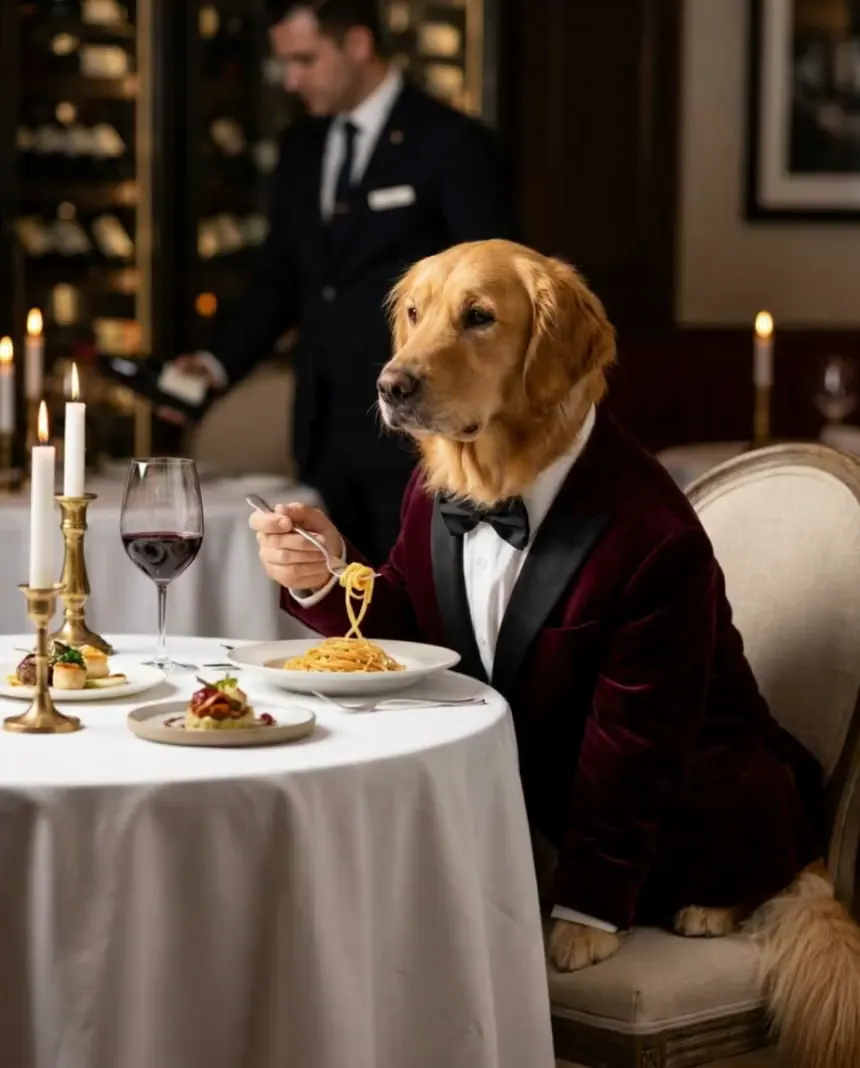
Image to video prompts: direct the motion, not the picture
Lesson 3 of the free course. Your start frame already decides the shot. Here is how to write the motion prompt: one camera move, one action, an end state, and the vocabulary to direct it.
How to write image prompts: the anatomy, words and habits that work
A practical text-to-image prompt guide built on real renders: the order to write things in, the camera and style words that visibly change a picture, how to make AI images look real, and how to turn a good prompt into a reusable template.
Run these prompts on every model, side by side.
PromptLab puts Flux, Nano Banana, Kling, Veo, Seedance and dozens more in one workspace. See the cost before you click, keep the prompts that win.