AI fashion photography: editorials, model photoshoots and lookbooks that hold up
How to art-direct AI fashion images for editorials, product pages and lookbooks: the wardrobe and lighting words that make clothes look real, how to keep one model and one garment consistent, and the consent rules that apply.
Updated · 13 min read · By the PromptLab team
The short version
- Decide the job first: an editorial sells a mood, an e-commerce photo sells one exact garment, and a lookbook sells a consistent set.
- Name fabric, drape, cut and finish. Clothes look fake when the model has to guess what they are made of.
- Describe the qualities of a photographer's work (scale, palette, set, light), never their name.
- A text prompt invents a garment. Reference images keep a lookbook consistent: in our test, one catalog shot carried the same face and outfit into two new scenes.
- Use generated or consenting models only, check prints, logos and hands at full size, and follow each platform's AI labeling rules.
In this guide
Editorial, e-commerce or lookbook: pick the job first
AI fashion photography is three different jobs that happen to share a tool. An editorial sells a mood. An e-commerce photo sells one exact garment to someone who will send it back if the color is off. A lookbook sells a collection, so every frame has to look like the same day, the same model and the same light. Most disappointing results come from mixing them up: an editorial prompt used for a product page, or a product-page workflow used for a campaign.
| Job | Goal | What must be right | Where AI stands |
|---|---|---|---|
| Editorial | Mood, story, attention | Concept, styling, set, light | Strongest fit: sets, casting and light from text |
| E-commerce | Sell one exact item | Color, fit, print, details, plain background | Needs a reference of the real garment and careful checks |
| Lookbook | Show a collection as a set | Same model, light, grade and framing in every frame | Needs references plus one fixed prompt template |
Image models are strongest at the editorial end: inventing a set, a cast and a lighting setup from a sentence is exactly what they do well. They are weakest at the product-page end, because a text prompt invents a garment that resembles yours instead of showing yours. Most of this guide is about closing that gap.
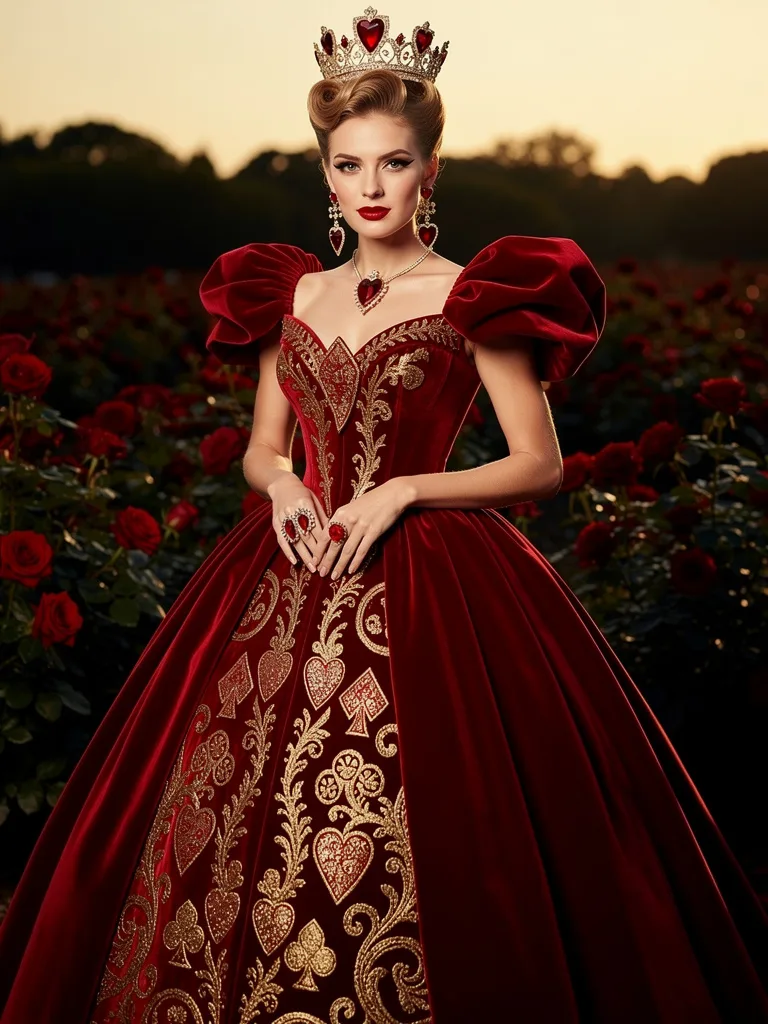
The Queen of Hearts as a haute-couture fashion portrait, red velvet and gold filigree gown, playing-card motifs, rose garden, Vogue cover lighting
- Subject what the picture is of
- Style medium, genre, reference
- Detail materials, wardrobe, texture
- Setting where, and what surrounds it
- Light source, direction, time of day
Twenty-two words produced the portrait at the top of this page. Everything the prompt left out, the model decided: the casting, the copper updo, the puffed velvet sleeves, the gold embroidery of hearts, clubs and spades, the hands clasped at the waist, the dusk sky. That works for a fantasy editorial. For a product page it is useless, because none of those decisions were yours and the gown doesn't exist.
How to art-direct an AI fashion editorial without naming photographers
An editorial prompt is a mood board in words: a concept, a set, a palette, a cast and a light. The concept can borrow a story everyone knows, such as a fairy tale, an era or a film genre, because a shared reference brings a whole world of props with it.
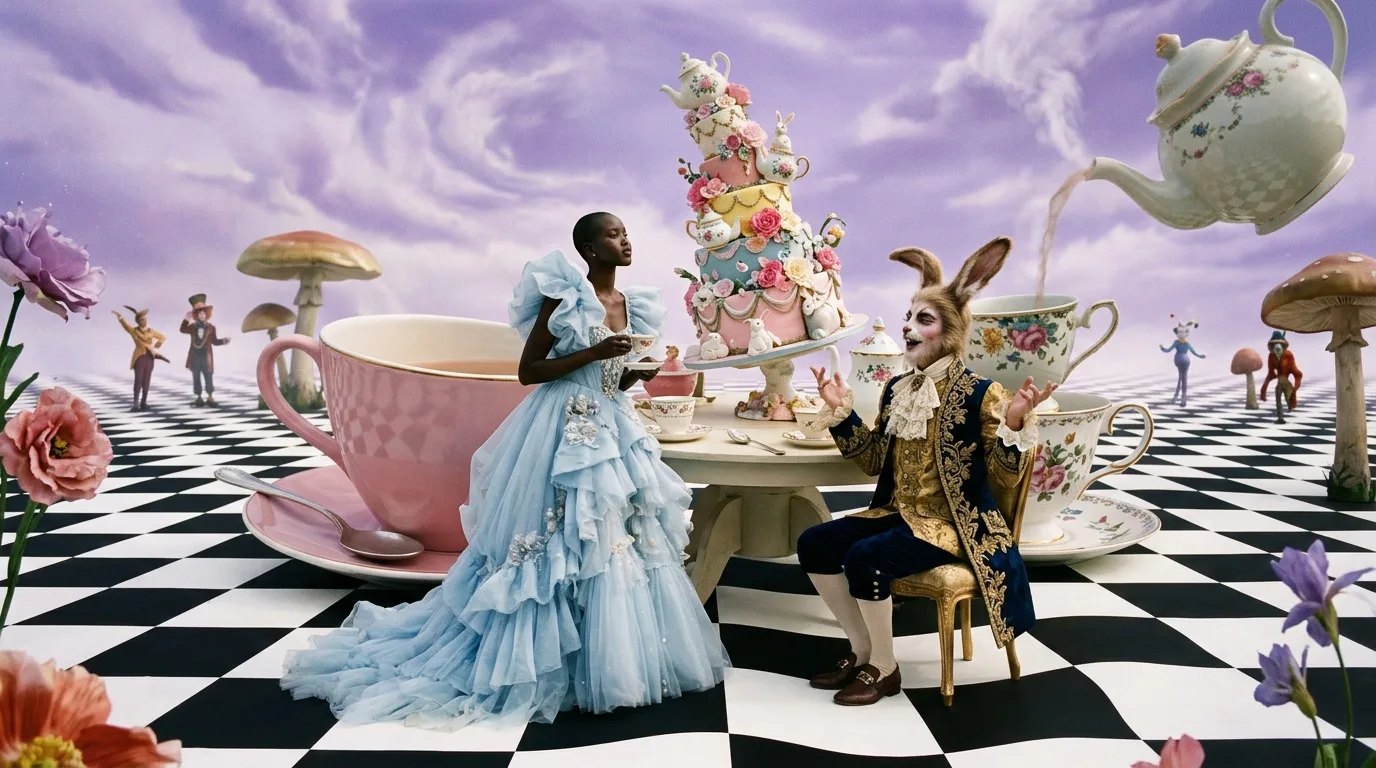
Alice in Wonderland tea party reimagined as a high-fashion editorial: oversized porcelain teacups, a towering tilted cake, a hare in a brocade waistcoat, a girl in a pale blue gown, checkerboard floor stretching to a lavender sky, surreal scale, Tim Walker photography style
Our tea party shows both sides of that. "Alice in Wonderland" pulled in things we never asked for: giant mushrooms, costumed figures on the horizon, a flying teapot pouring into a cup. The wardrobe, which we did describe, came back close to the brief: a tiered, ruffled pale blue tulle gown, and a hare in a gold brocade waistcoat under a navy coat embroidered in gold.
Look at how that prompt ends, though: a living photographer's name followed by "photography style". We wouldn't write it that way again. Naming a living artist borrows their signature without asking, and it is imprecise: you can't tell which of their qualities the model picked up, so you can't turn any of them up or down. Describe the qualities instead.
| Quality | Words that describe it |
|---|---|
| Scale | surreal scale, oversized props, a tiny figure in a vast set |
| Palette | soft pastel palette, powder blue and lavender, sugared-almond colors |
| Set | theatrical handmade set, painted backdrop, props that look built rather than rendered |
| Light | diffused daylight, or hard flash with crisp shadows for a harder edge |
| Medium | medium-format film photograph, gentle grain |
| Mood | whimsical, dreamlike, playful, slightly unsettling |
[story or era] reimagined as a high-fashion editorial: [two or three oversized props], [model and gown], [set and floor], [scale], [set style], [palette], [light], [medium]
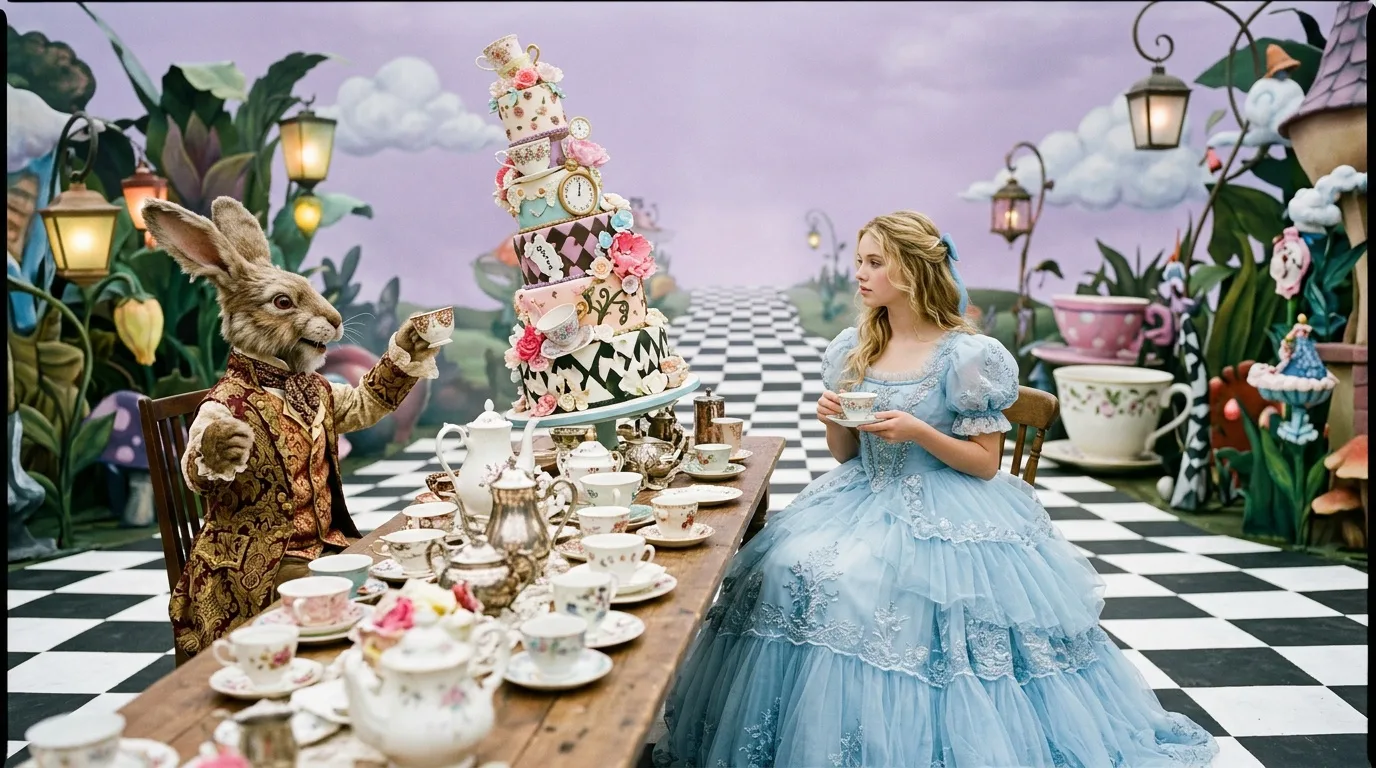
Alice in Wonderland tea party reimagined as a high-fashion editorial: oversized porcelain teacups, a towering tilted cake, a hare in a brocade waistcoat, a girl in a pale blue gown, checkerboard floor stretching to a lavender sky, theatrical hand-built set, exaggerated surreal scale, soft pastel palette, diffused overcast light, medium-format film look
Compare it with the first version above. The rewrite is just as rich, and you can trace where each word went. "Theatrical hand-built set" produced a stage: a painted lavender backdrop with clouds, lanterns and oversized flowers, and a checkerboard floor running to the horizon. The hare got its brocade waistcoat and the girl a ruffled, embroidered blue gown. The diffused light and film look came through as soft contrast and a little grain. The one quality that came back weaker is scale: two outsized teacups sit at the edge of the set, but nothing matches the giant cup and flying teapot of the first version. If scale matters most, that is the word to push, with something concrete like "teacups taller than the girl".
Wardrobe words that make AI clothes look real
Clothes look fake in AI images for the same reason products do: when the model doesn't know what something is made of, it invents a smooth, weightless material that catches light like plastic. Fabric is information. Velvet has a pile that goes dark in the folds and bright where it faces the light. Silk charmeuse throws liquid highlights. Tweed shows its weave. Name the fabric and the model has to render how it behaves.
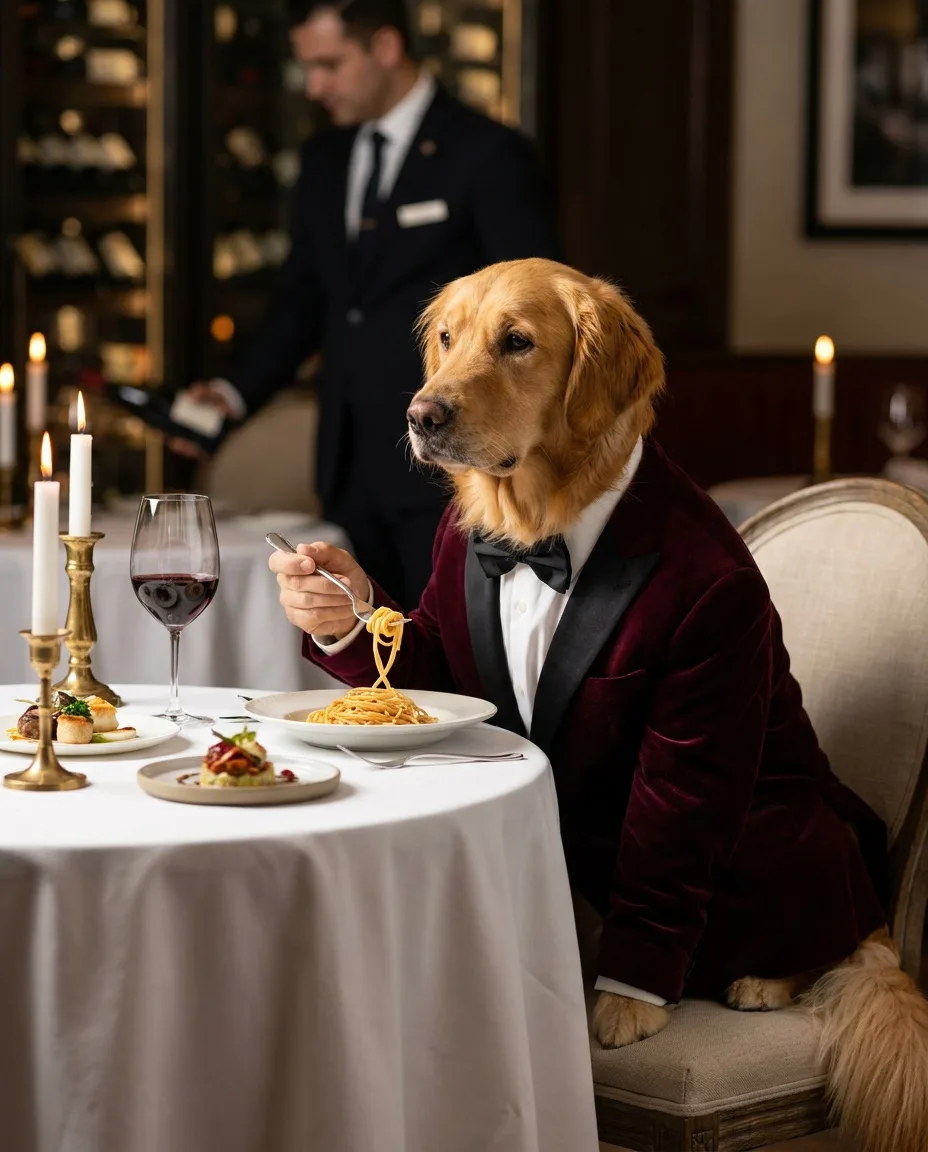
A golden retriever wearing a velvet dinner jacket and bow tie, seated at a Michelin-star restaurant, delicately twirling spaghetti with a silver fork, candlelight, white tablecloth, sommelier blurred in the background, editorial food photography, 85mm, shallow depth of field
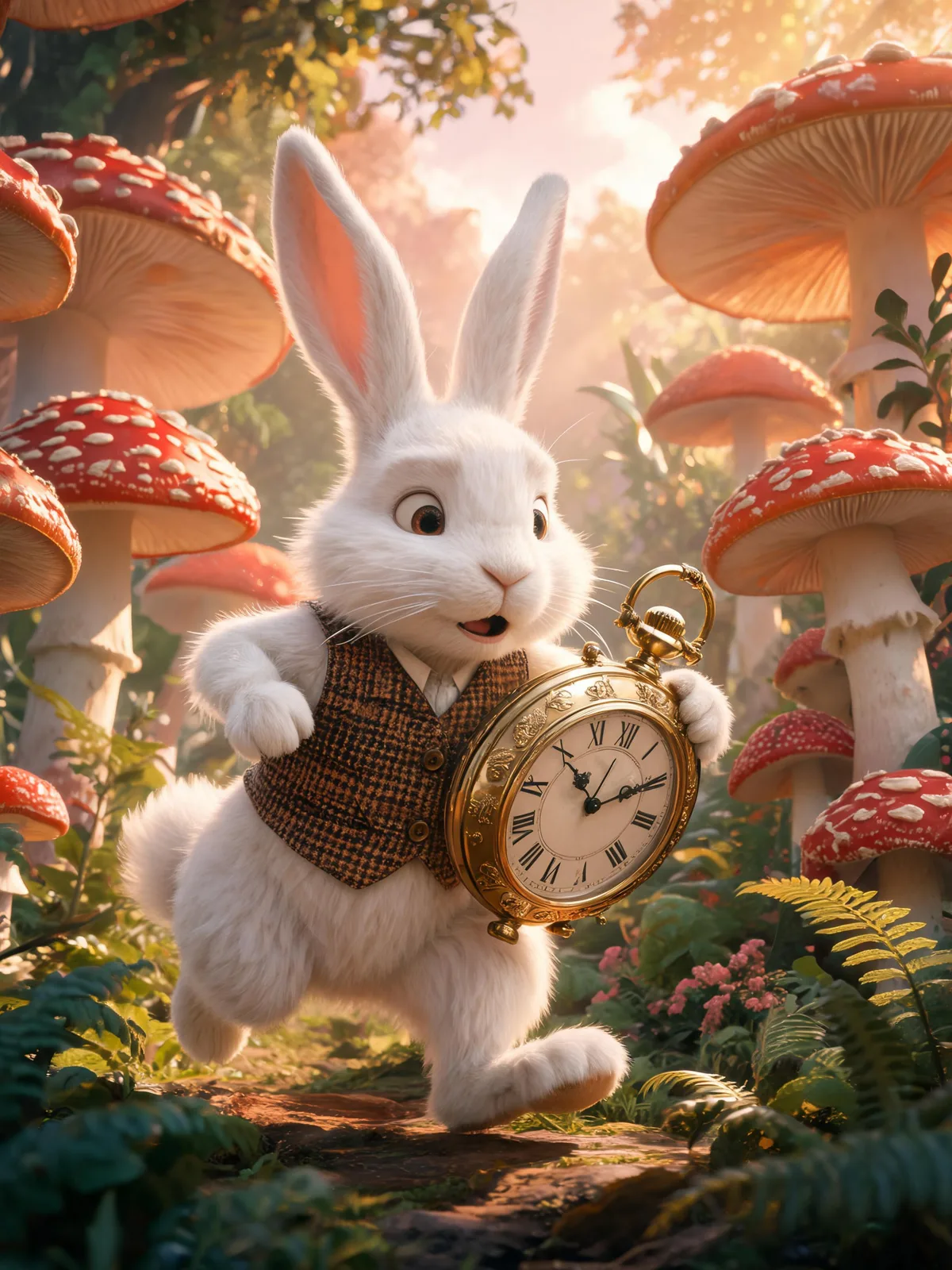
The White Rabbit in a tweed waistcoat checking an enormous brass pocket watch, hurrying through a mushroom forest, late-afternoon rays, storybook realism
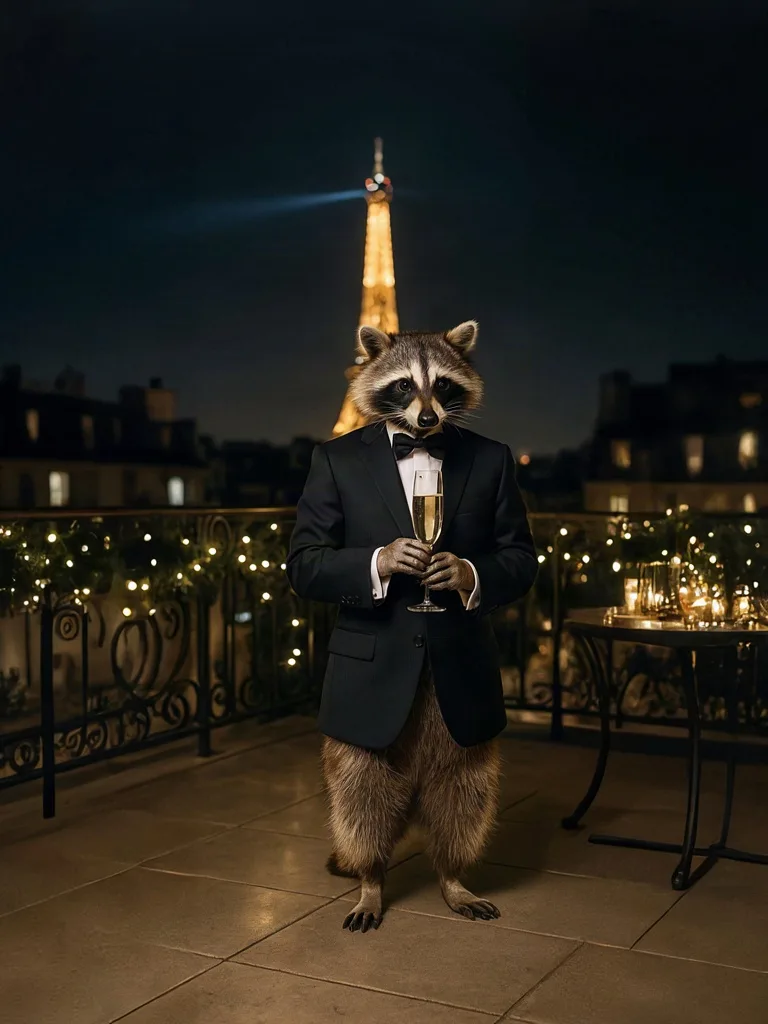
A raccoon in a perfectly tailored tuxedo sipping champagne at a rooftop gala in Paris at night, Eiffel Tower bokeh behind, editorial photograph, 85mm lens, shallow depth of field
The dinner jacket reads as velvet at a glance, and the model added a black satin shawl lapel that nobody asked for but any tailor would expect. The rabbit's tweed waistcoat shows its woven check, even though the rabbit itself came out looking like an animated film character. The third image is the warning. Asked for "a perfectly tailored tuxedo", Ideogram 4 drew a jacket and bow tie over bare, furry legs. If a piece of the outfit matters, name it.
Five kinds of words do most of the work:
| Category | Examples | What it controls |
|---|---|---|
| Fabric | velvet, silk charmeuse, organza, tulle, bouclé, tweed, raw denim, nappa leather, chunky cable knit | How the surface takes light and shows texture |
| Drape | fluid, bias-cut, structured, stiff, clinging, billowing, heavy folds | How the fabric falls and moves on the body |
| Cut and silhouette | A-line, column, oversized, cropped, wide-leg, puff sleeve, sweetheart neckline, double-breasted | The shape of the garment and the outline of the figure |
| Finish and fit | matte, high-shine, washed, crinkled, tailored, relaxed, boxy, ankle-length | Surface treatment and how close the garment sits |
| Styling | half-tucked, sleeves pushed up, collar open, one shoulder slipped, belted at the waist | The hand of a stylist, which is what makes a look feel worn |
[garment] in [fabric] with a [finish] finish, [cut and silhouette], [how it drapes or moves], worn with [shoes] and [one accessory], [one styling detail]
How to direct casting, pose and expression
Write casting the way an agency brief does: age range, build, hair texture and style, skin, and the energy you want. Leave it out and you get the model's default, which varies by model and by run. Flux 2 Pro gave our Queen of Hearts a classic glamour look with heavy makeup and retouched-smooth skin. Nano Banana 2 cast Alice as a dark-skinned model with a shaved head, which the prompt never mentioned. Neither result is wrong, but neither was a decision. If who appears in your imagery matters to your brand, write it down.
Describe people with generic, visible features ("woman in her forties, silver bob, freckles, athletic build"), never with the name of a real model, actor or influencer. Pose and expression need the same precision:
- Standing: weight on the back leg, hip shifted; walking toward the camera mid-stride; leaning on a wall with one foot up.
- Seated: perched sideways on a chair arm; on stone steps, elbows on knees.
- Hands: one hand in a pocket; fingers at the collar; holding a lapel. Giving hands a job is often the simplest way to avoid strange ones.
- Expression: neutral editorial gaze into the lens; looking past the camera; a candid half-laugh; eyes closed, chin lifted.
- Camera: full-length at eye level for product pages, a low angle for power, a three-quarter view to show the cut.
Then check the hands at full size. Our velvet-jacketed retriever holds its fork with a human hand, which is funny in a novelty image. On a fashion model, a sixth finger or a fused thumb gets the frame rejected.
Fashion lighting setups, and how to prompt them
Light changes every pixel of the frame, so it is one of the strongest things you can put in a prompt. Fashion photographers pick a setup for the job, and each setup comes with words you can borrow:
| Setup | Prompt words | Look | Good for |
|---|---|---|---|
| Beauty dish | beauty dish key light slightly above eye level, round catchlights | Crisp, sculpted cheekbones, glossy skin | Beauty, close portraits |
| Hard on-camera flash | direct on-camera flash, hard shadow behind the model, night | Raw, glossy, party or street energy | Streetwear, nightlife editorials |
| Overcast daylight | soft overcast daylight, open shade | Even, true color, no hard shadows | Outdoor product shots, lookbooks |
| Window light | large window light from the side, soft falloff into shadow | Intimate, painterly | Knitwear, lingerie, quiet editorials |
| Colored gels | magenta and teal gel lights, colored rim light | Graphic, nightlife, music video | Campaigns, beauty, accessories |
| White studio | seamless white backdrop, soft even light from both sides | Clean, nearly shadowless, catalog | On-model product pages |
To see how much the light words carry, we ran one portrait prompt three times on Flux 2 Pro and changed only the lighting phrase: on-camera flash, window light and colored gels.
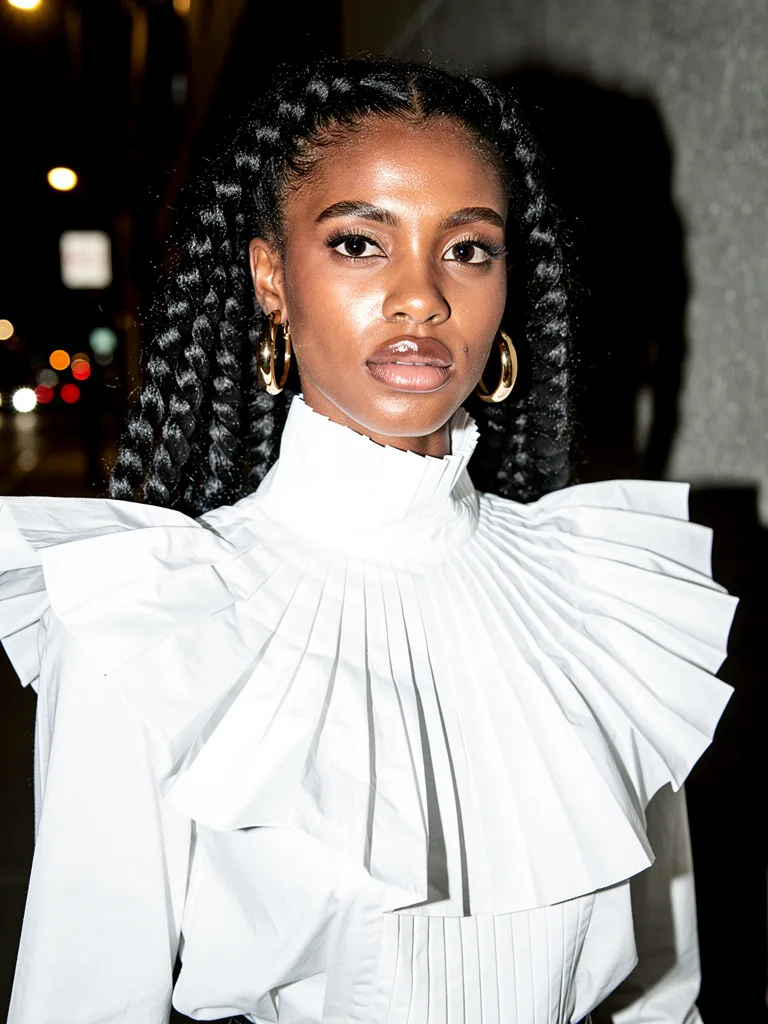
Fashion portrait of a woman with long braided hair wearing a sculptural high-neck white cotton blouse and gold hoop earrings, waist-up, direct on-camera flash at night on a city sidewalk, hard shadow behind her, glossy highlights, fashion editorial photograph
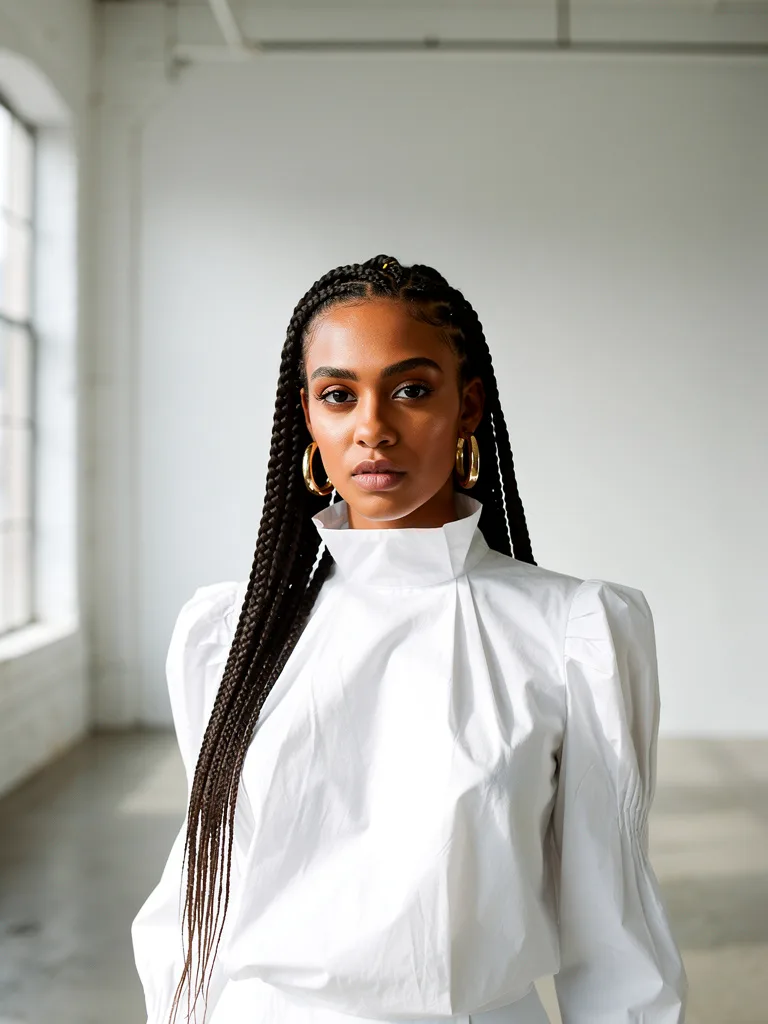
Fashion portrait of a woman with long braided hair wearing a sculptural high-neck white cotton blouse and gold hoop earrings, waist-up, large window light from the left in an empty white loft, soft falloff into shadow, fashion editorial photograph
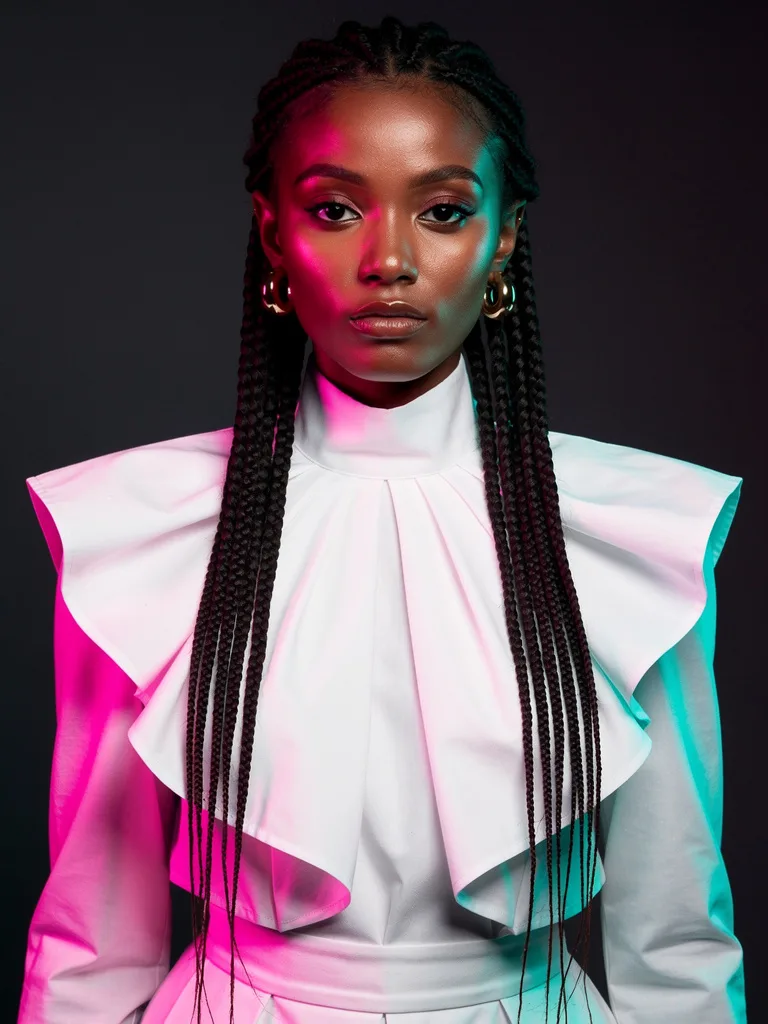
Fashion portrait of a woman with long braided hair wearing a sculptural high-neck white cotton blouse and gold hoop earrings, waist-up, magenta and teal colored gel lights from either side against a dark studio backdrop, fashion editorial photograph
The light did what each phrase asked. The flash frame has the hard shadow on the wall behind her, glossy highlights on skin and lips, and city bokeh. The gels split her face and blouse into magenta and teal against a dark backdrop. The window frame is the softest and most even of the three, with the window itself visible on the left, though the falloff into shadow is gentler than the prompt implies.
Look past the light, though, and this is not a clean A/B test. The woman is a different person in each frame, the braids are styled differently, and the "sculptural high-neck blouse" became three different garments: a pleated fan collar, a simple stand collar with puffed sleeves, and a wide cape collar. With no reference image and no fixed seed, every run re-rolls everything the prompt leaves open. To compare lighting for a real shoot, pass the same model and garment in as references so the light is the main thing that changes. Fixing the seed, where a model lets you, reduces the drift but doesn't remove it, because the changed words still change the picture.
The Queen of Hearts prompt says "Vogue cover lighting". It worked as a vague glamour signal: soft light on the face and a warm sky behind her. But a magazine name is not a setup, so you can't push it in any direction. "Large soft key light from the front, low warm sun behind, gentle rim on the hair" describes the same look with handles you can turn.
How to make AI models wear your clothes, consistently
This is what most brands actually want: their real garment, on the same model, across a whole set. Two things have to stay fixed, the garment and the person, and text can't reliably hold either one. Reference images can.
Photograph the garment properly
Flat lay or on a hanger, front and back, in even daylight on a plain background. Add close-ups of prints, logos, hardware and labels: those are the first details to drift, and a close-up gives the model something to copy.
Fix the model
Generate a casting image you like and reuse it as a character reference in every frame, or use photos of a real model who has agreed in writing to this use. Several image models take multiple references at once. Google says Nano Banana Pro can blend up to 14 images and keep up to five people consistent, and Black Forest Labs documents up to 10 reference images for Flux 2 Pro.
Write one shared style line
Light, lens, grade and setting stay identical in every prompt. Only pose and framing change.
Check each frame against the sample
At 100% zoom: print scale and placement, logo, button count, hem length, and color under the new light.
Fix, don't re-roll
Correct a drifting logo or button with a targeted edit pass. If a print refuses to hold, composite the real fabric in post rather than accepting a lookalike.
The model from reference 1 wearing the [garment] from reference 2, keeping its color, print and details unchanged, [pose], [framing], [setting], [shared light and style line], [aspect ratio]
A shared style line gives you a consistent look, not a consistent person. Our six matrix renders share one ending, "cinematic golden hour, 35mm film photograph, slight motion blur, joyful", and the light, grain and mood match across the set. The subjects are different animals by design. Identity comes from references, not from wording.
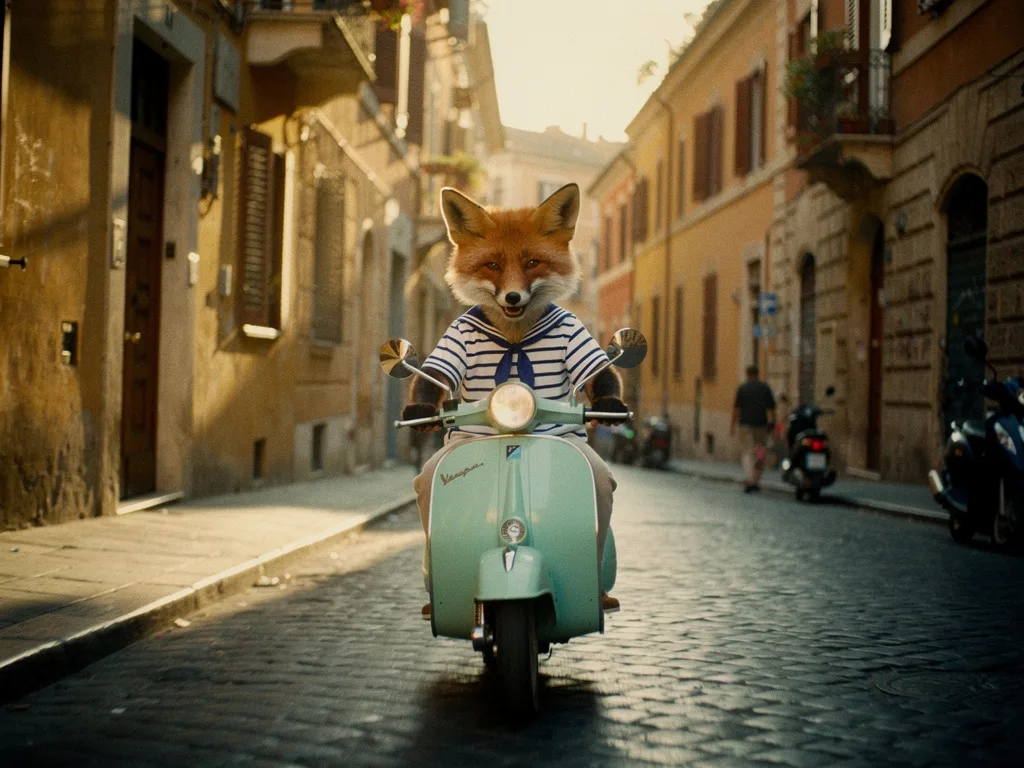
A red fox in a striped sailor shirt riding a mint-green Vespa through a cobbled street in Rome, cinematic golden hour, 35mm film photograph, slight motion blur, joyful
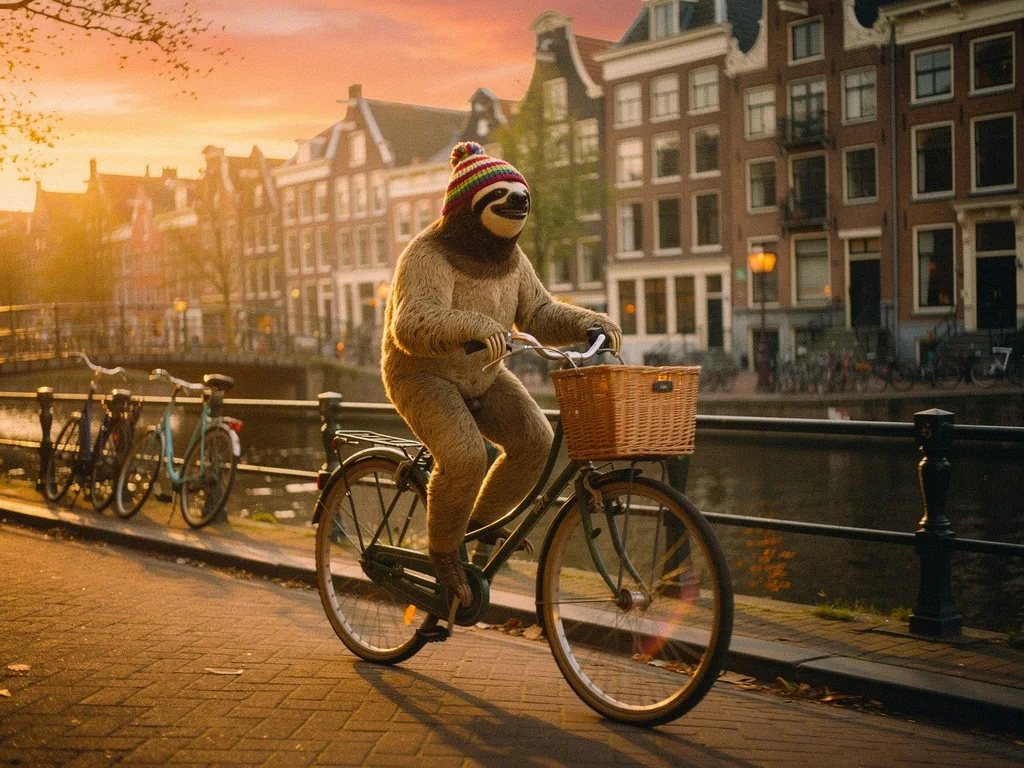
A sloth in a knitted beanie riding a Dutch bicycle through an Amsterdam canal street, cinematic golden hour, 35mm film photograph, slight motion blur, joyful
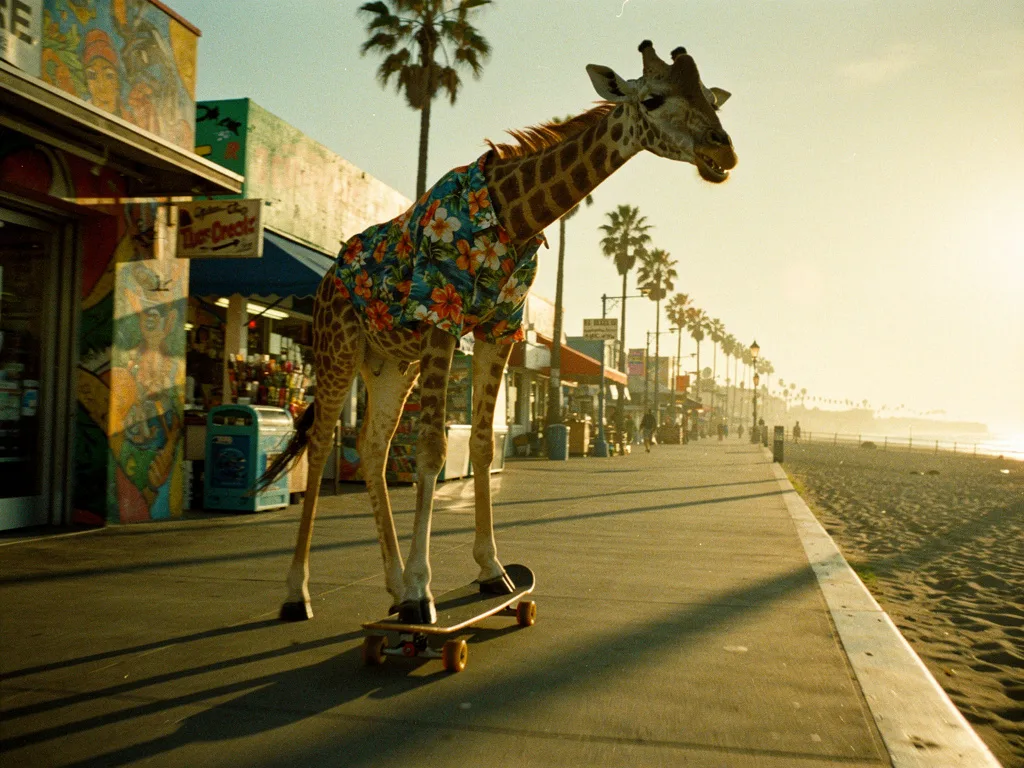
A giraffe in a Hawaiian shirt riding a longboard skateboard through Venice Beach boardwalk, cinematic golden hour, 35mm film photograph, slight motion blur, joyful
One reference, a whole lookbook
Here is what a reference does. We started with a single full-length catalog shot on Nano Banana Pro: a woman with a black bob in a camel coat, cream cable-knit, charcoal wide-leg trousers and white sneakers.
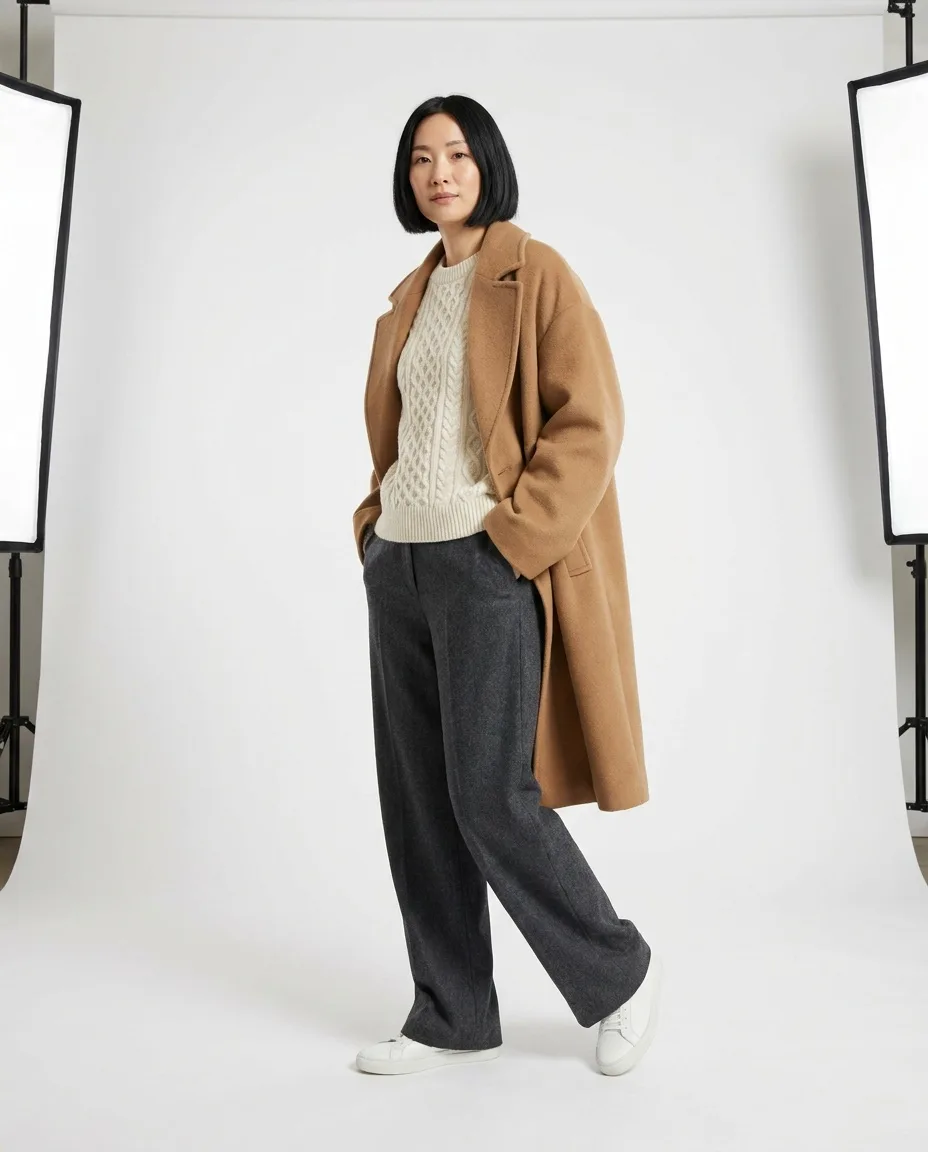
Full-length e-commerce photo of a woman in her thirties with a short black bob and a calm expression, wearing an oversized camel wool coat over a cream cable-knit sweater and wide-leg charcoal wool trousers, white leather sneakers, standing with her weight on the back leg, hands in her coat pockets, seamless white studio backdrop, large softboxes on both sides, even light, e-commerce catalog photography
It is a usable casting image, but not a finished product shot. The prompt asked for a seamless white backdrop and "large softboxes on both sides", and the model drew the softboxes, stands and the edge of the paper sweep into the frame. Name equipment and it may appear in the picture. Describe the light it makes ("soft, even light from both sides") and crop or edit out anything that still sneaks in.
We then passed that one image to Nano Banana Pro Edit as the only reference and asked for the same woman in the same clothes in two new places.
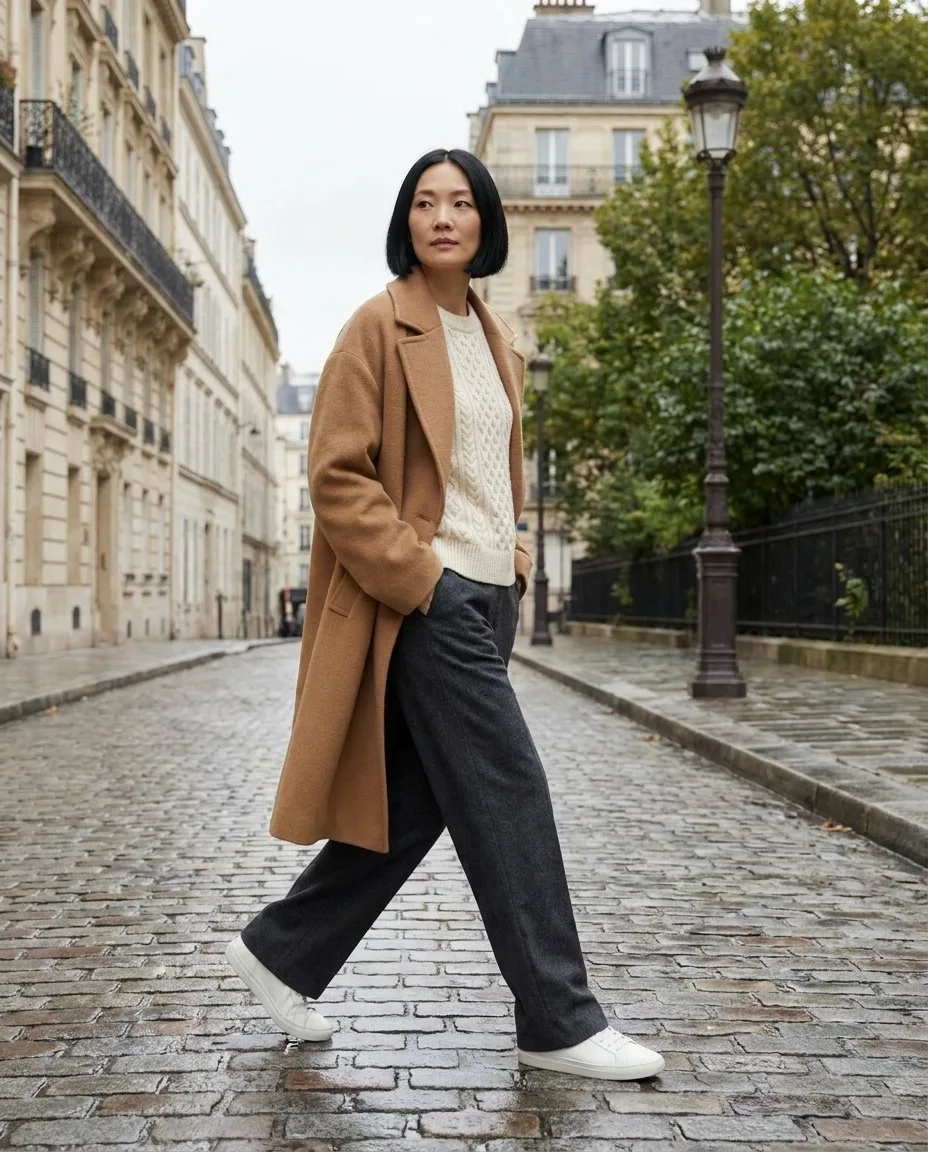
The same woman from the reference image, same face and short black bob, wearing exactly the same camel coat, cream sweater, charcoal trousers and white sneakers, now walking across a cobbled Paris street on an overcast morning, mid-stride, looking past the camera, soft diffused daylight, 50mm lens, fashion lookbook photography
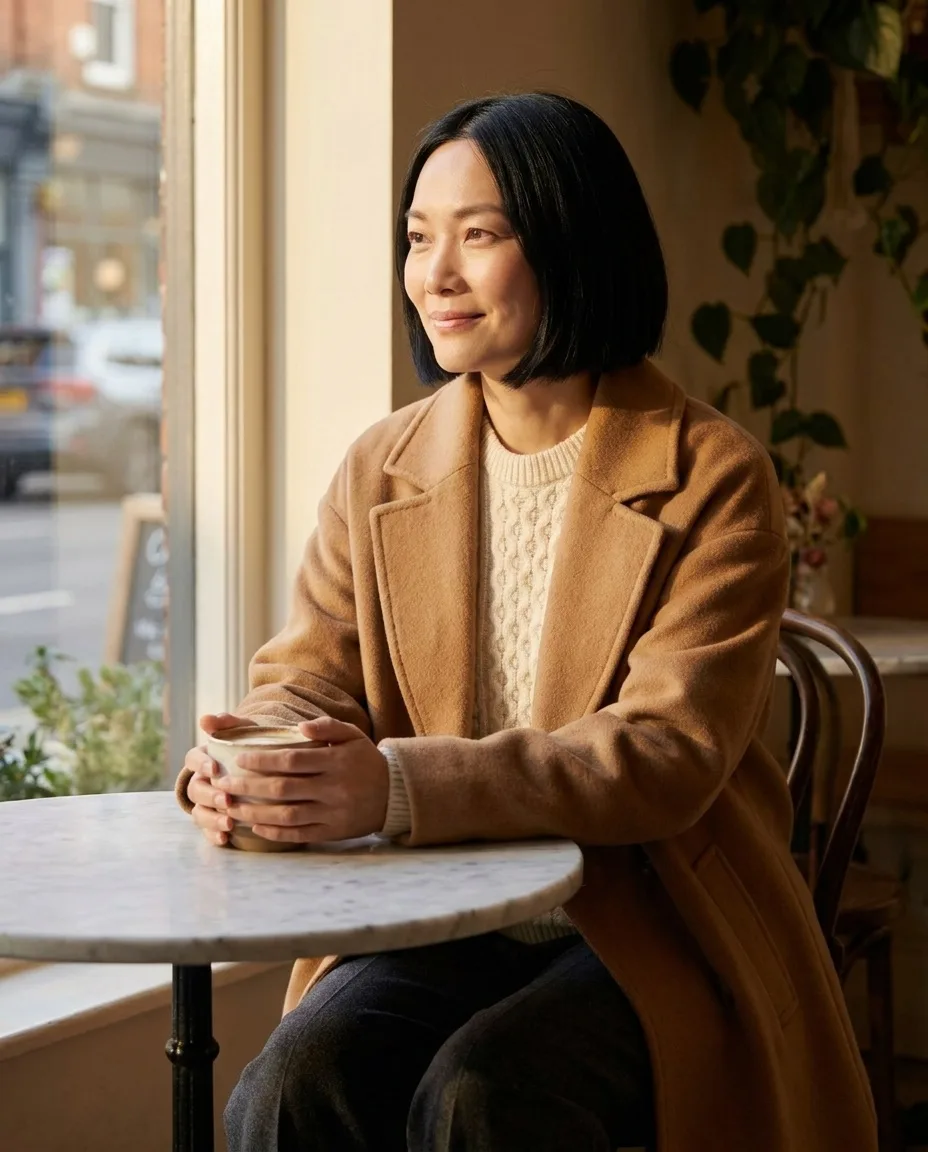
The same woman from the reference image, same face and short black bob, wearing exactly the same camel coat, cream sweater and charcoal trousers, seated at a small marble café table by a large window, holding a coffee cup, warm side light from the window, relaxed half smile, 85mm lens, fashion lookbook photography
Both frames hold. The face, the blunt bob, the camel coat with its wide lapels, the cream sweater and the charcoal trousers carry across a walking shot on wet cobbles and a seated shot by a sunny café window, with new light, lenses and expressions, and the white sneakers reappear in the street frame. The one drift we found is in the knit: the café sweater has a finer, smaller cable than the chunky one in the reference, which is exactly the kind of detail to check at full size before it reaches a product page.
A flat lay, worn
The garment works the same way. Our reference here is a generated flat lay of a striped shirt on Flux 2 Pro; in practice you would use a photo of your real sample. The edit prompt names what must not change.
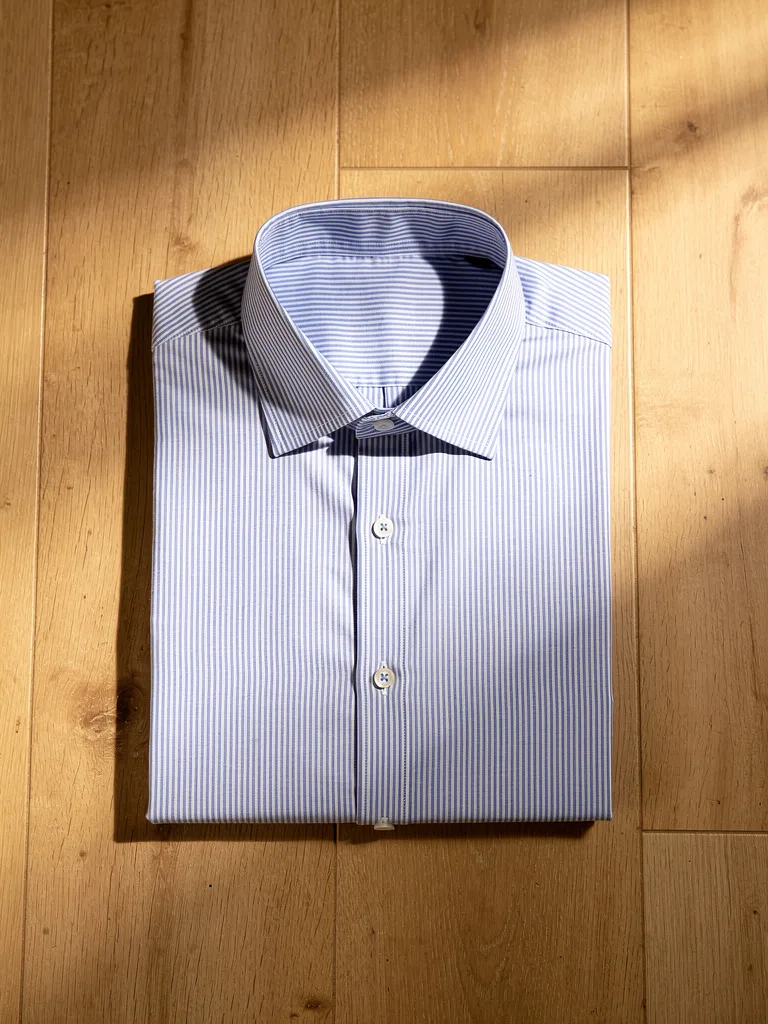
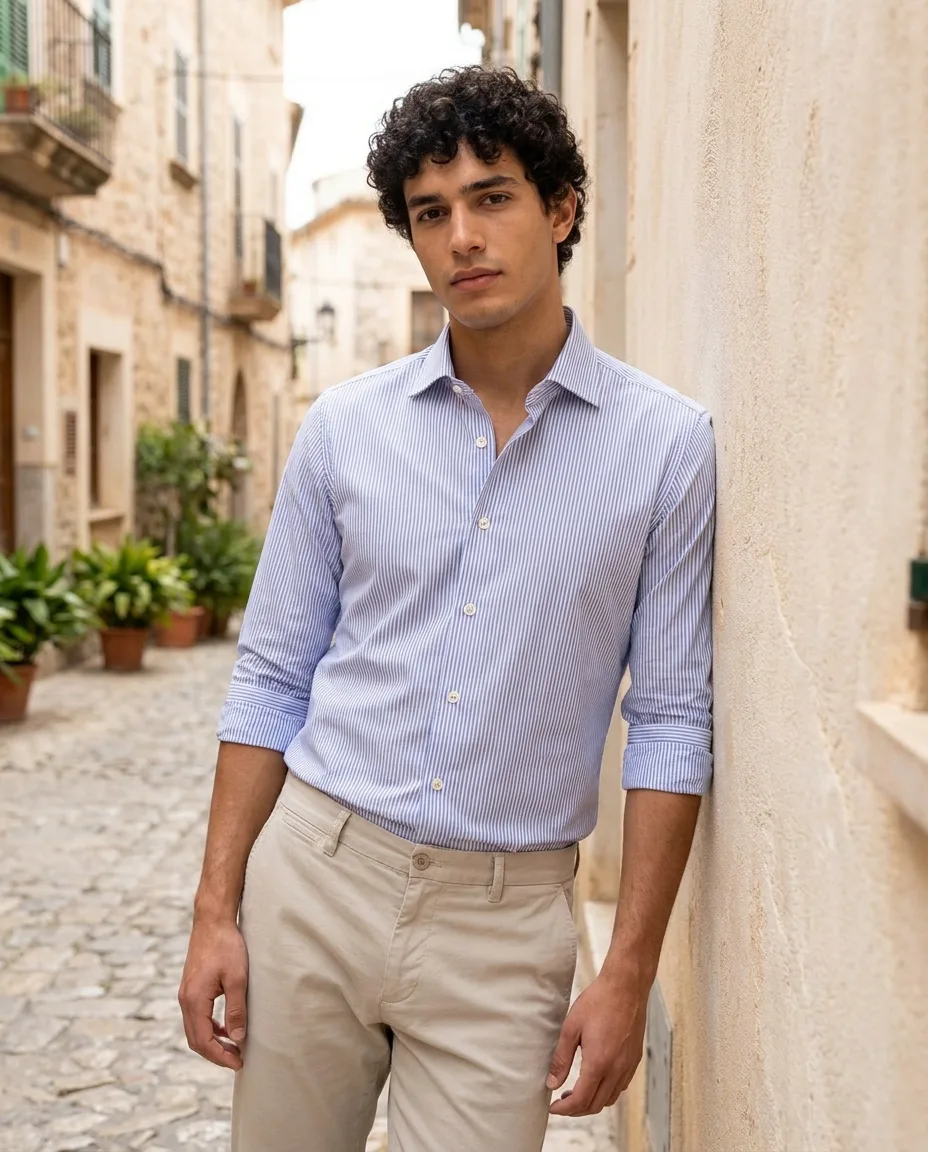
A man in his twenties with curly dark hair wearing the exact blue and white striped shirt from the reference image, same stripe width, same collar and white buttons, sleeves rolled to the elbow, tucked into stone-colored chinos, leaning against a sunlit plaster wall in a Mediterranean street, bright overcast daylight, e-commerce lifestyle photography
At full size the transfer is close: the same fine blue and white stripe at a similar scale, the same collar shape and the white buttons. The model also had to invent what the folded flat lay doesn't show, such as the cuffs, the back and the length, so those are the parts to compare against the real garment.
For a lookbook film, animate your approved stills with image-to-video instead of re-describing the look. The clip below was text-to-video on Veo 3.1 Fast, and the wardrobe wandered: the hare's brocade waistcoat became a red patterned dress with a white apron, and the tea poured down into the cup although the prompt asked for it to flow upward. Some video models are also strict about faces: Seedance 2.0, for example, has been reported to reject reference images that contain real human faces.
Slow push-in on a surreal Alice in Wonderland tea party: oversized porcelain teacups float and spin slowly, a hare in a brocade waistcoat pours tea that flows upward, checkerboard floor, lavender sky, high-fashion editorial, dreamy
The consistent characters lesson goes deeper on reference sheets, and the image-to-video lesson covers camera moves. In PromptLab, the Playground's character and edit tools only list models that accept reference images, and Consistency renders one template across up to 10 variable combinations in a single run, with pass/fail scoring for each frame.
Beauty close-ups: skin, makeup and the product
Beauty is the least forgiving fashion genre because the camera is close and skin is the subject. The common failure is plastic skin, and words like "flawless" and "perfect skin" push further in that direction. Ask for texture instead: visible pores, fine facial hair, natural skin texture, light retouching. Then be as specific about makeup as you are about wardrobe:
- Skin finish: dewy, satin, matte, sheer foundation with freckles showing through.
- Eyes: graphic black liner, smudged kohl, glossy lids, clumped mascara.
- Lips: blurred matte red, clear gloss, overlined nude.
- Cheeks and brows: blush draped high on the cheekbones, brushed-up brows.
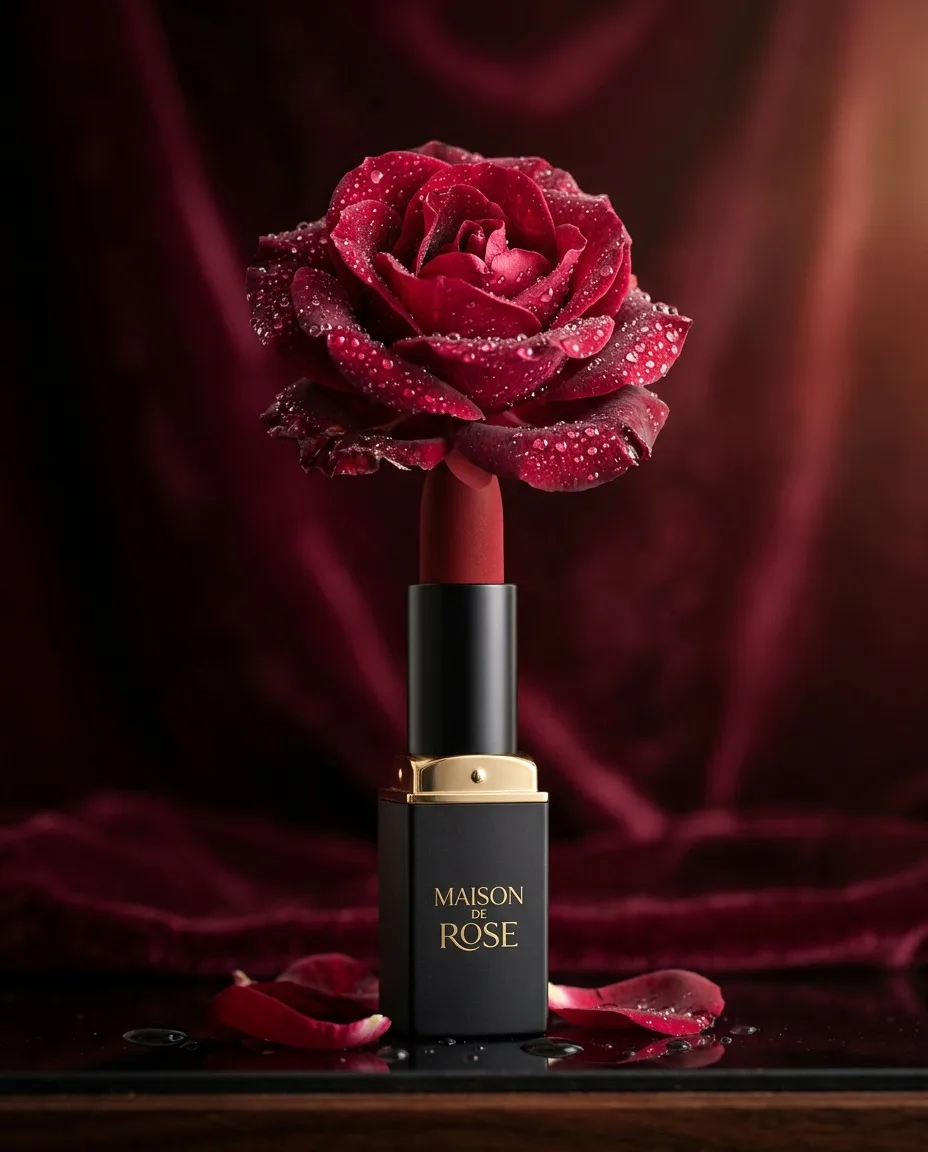
A matte red lipstick standing upright, its tip blooming into real rose petals, dew drops, deep burgundy backdrop, luxury cosmetics advertisement
The lipstick shot works as a beauty mood image, and it carries a lesson: the model printed "Maison de Rose" on the case, a brand name nobody asked for. Fine for a mood board. For a real product, pass your own packshot in as a reference, as the product photography guide explains.
Close-up beauty portrait of [casting], [skin finish] skin with visible natural texture, [eye look], [lip look], [hair detail], [light setup], 100mm macro lens, [backdrop color], beauty campaign photography
Which models to use, and what our renders cost
Here are the main renders in this guide, with what each one actually cost. These are the models we happened to use, not a ranking: several newer image and video models have shipped since, and the right choice depends on whether you need invention (any strong text-to-image model) or fidelity to a real garment (a model that accepts references).
| Render | Model | Credits | Plan value | Per second |
|---|---|---|---|---|
| The Queen of Hearts as a… | Flux 2 Pro | 8 | $0.08 | — |
| Alice in Wonderland tea party… | Nano Banana 2 | 20 | $0.20 | — |
| Fashion portrait of a woman with… | Flux 2 Pro | 8 | $0.08 | — |
| Full-length e-commerce photo of a… | Nano Banana Pro | 38 | $0.38 | — |
| The same woman from the reference… | Nano Banana Pro Edit | 38 | $0.38 | — |
| Flat lay of a folded blue and white… | Flux 2 Pro | 8 | $0.08 | — |
| A man in his twenties with curly… | Nano Banana Pro Edit | 38 | $0.38 | — |
| A matte red lipstick standing upright | Nano Banana 2 | 20 | $0.20 | — |
| Slow push-in on a surreal Alice in… | Veo 3.1 Fast · 6 s | 150 | $1.50 | 25 cr |
Explore casting, sets and light on inexpensive models, then move to reference-capable models once the real garment has to appear in the frame. In our runs, each lighting study cost 8 credits on Flux 2 Pro, while each reference-driven lookbook frame on Nano Banana Pro Edit cost 38. Because reference fidelity varies by model and by run, test the same garment photo on several of them before committing a whole lookbook. PromptLab's Benchmark runs one prompt and the same references on up to four models side by side, with ratings for resemblance and style, and the models page lists current prices.
Likeness, consent and disclosure rules for AI models
- Real people need consent. Don't generate recognizable real people (celebrities, influencers, a model you once booked) without written permission. In New York, the Fashion Workers Act, in force since June 2025, requires a model's separate, explicit written consent before a management company or client creates or uses their digital replica.
- Describe artists, don't name them. Prompt for qualities rather than a living photographer's name, and don't ask for a living designer's signature print or a brand's logo on your generated clothes.
- Casting is a visible brand decision. Choose it deliberately, and don't present generated faces as the real people who make or wear your product.
- Disclose where platforms ask. YouTube, TikTok and Meta all have labels for realistic AI-generated content and ask creators to disclose it. Policies change, so check each one before you post.
- Marketplaces judge what the image depicts. If a shopper receives something that looks different from the photo, the listing is misleading, whoever or whatever made the image. Amazon's published main-image rules, for example, call for a professional photograph of the actual product on pure white. Check your marketplace's current policy before listing AI imagery.
Before you publish
- Color, print scale, logo and hardware match the physical sample
- Hands, fingers and jewelry are correct at 100% zoom
- The model is generated, or a real person who consented in writing
- No invented brand names, labels or text
- AI labels set wherever the platform asks for them
Send it back
- A print that changes scale from frame to frame
- Extra buttons, fused fingers, a sixth earring
- A face that looks like someone famous
- A fit that flatters more than the real garment does
- A designer's signature look named in the prompt
Questions people ask
Can AI put my own clothes on a model?+
Yes, with an image model that accepts reference images: upload clean photos of the garment (and of the model, if you are reusing one), describe only the pose, setting and light, and ask to keep the garment unchanged. Check prints, small logos and color at full size, because those drift first.
Can I use AI model photos on Amazon or other marketplaces?+
Check each marketplace's current image policy before you list. Amazon's published main-image rules call for a professional photograph of the actual product on a pure white background, and every marketplace expects images to show the item accurately.
Is it legal to use AI-generated models in fashion ads?+
Generated people who don't resemble anyone are generally usable under the model provider's license, but recreating a real person's likeness needs their consent, and New York's Fashion Workers Act requires a model's separate written consent for a digital replica. Platforms such as YouTube, TikTok and Meta also ask you to label realistic AI content.
How do I keep the same AI model across a whole lookbook?+
Pick one casting image and pass it as a character reference in every frame, keep the light, lens and setting words identical, and change only pose and framing. A shared style line keeps the look consistent; only references keep the face and the garment the same. In our test, one catalog image passed to Nano Banana Pro Edit held the face, hair and outfit across a street shot and a café shot, with only the knit pattern drifting slightly.
How do I get a famous photographer's look without naming them?+
Describe the qualities you admire instead: scale, palette, set design, light, lens and mood. It avoids imitating a living artist by name and gives you more control, because each quality can be changed on its own.
Keep learning
How to write image prompts: the anatomy, words and habits that work
A practical text-to-image prompt guide built on real renders: the order to write things in, the camera and style words that visibly change a picture, how to make AI images look real, and how to turn a good prompt into a reusable template.
AI product photography: prompts, light and packshots that sell
A practical guide to AI product shots that look like a campaign rather than a stock photo: how to structure the prompt, pick a surface, light it like a photographer, and keep your real product accurate.
Consistent characters in AI video: lock the look before you animate
Lesson 2 of the free course. Why AI characters change from shot to shot, and the workflow that stops it: a style bible, a character sheet, reference images, and animating only frames you have already approved.
Run these prompts on every model, side by side.
PromptLab puts Flux, Nano Banana, Kling, Veo, Seedance and dozens more in one workspace. See the cost before you click, keep the prompts that win.